LinkedIn GPT-4o Google Sheets Content Creation n8n

Multi-agent LinkedIn content creation with GPT-4o, Google Sheets, and human review

Production-grade content engine combining AI efficiency with human expertise for LinkedIn thought leadership

Download Template JSON · n8n compatible · Free
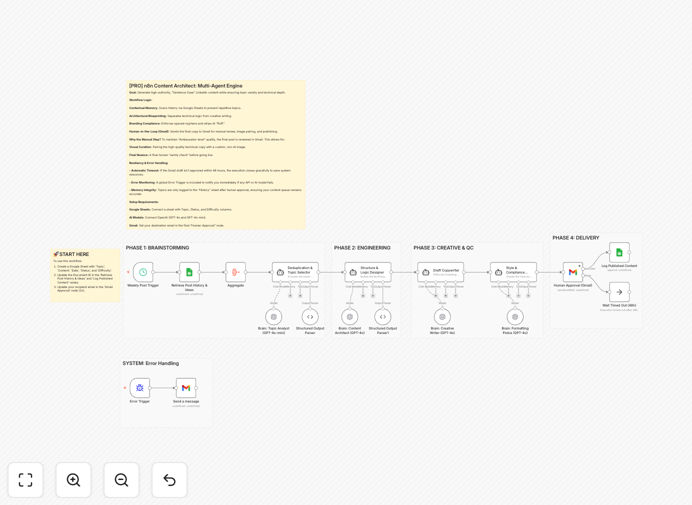
LinkedIn content creation workflow interface

What This Workflow Does

This production-grade content engine solves the challenge of maintaining a consistent LinkedIn presence with high-quality, technically authoritative content. Many professionals struggle to post regularly while maintaining depth and authenticity in their content. This workflow combines the efficiency of AI with human oversight to create a scalable content pipeline.

Unlike generic AI content generators, this multi-agent system assigns specialized roles to different AI instances - one for research, another for drafting, and others for optimization and formatting. The human review step ensures all content aligns with your personal brand and expertise before scheduling.

How It Works

1. Content Ideation

The workflow begins by analyzing trending topics in your industry and suggesting content ideas based on your expertise areas. These ideas are logged in Google Sheets for easy team collaboration.

2. Multi-agent Generation

Different GPT-4o agents work in sequence - first researching the topic, then drafting content with appropriate technical depth, and finally optimizing for LinkedIn's algorithm and readability.

3. Human Review & Editing

Generated drafts are sent to a Google Sheet where you or your team can review, edit, and add personal anecdotes. This ensures the content maintains your authentic voice.

4. Scheduling & Publishing

Approved posts are automatically formatted for LinkedIn and scheduled according to your optimal posting times, creating a consistent presence without daily effort.

Pro tip: Use the Google Sheet to track which types of content perform best, creating a feedback loop that improves your AI agents' output over time.

Who This Is For

This workflow is ideal for:

  • Technical founders establishing thought leadership
  • Marketing teams managing multiple executive profiles
  • Consultants who need to demonstrate expertise consistently
  • Content teams scaling quality output without expanding headcount

What You'll Need

  1. An n8n instance (cloud or self-hosted)
  2. OpenAI API access with GPT-4o capability
  3. A Google Sheets account
  4. LinkedIn publishing access (either personal profile or Company Page admin)

Quick Setup Guide

  1. Download and import the JSON template into your n8n instance
  2. Connect your Google Sheets account and specify your content tracking sheet
  3. Configure your OpenAI API credentials
  4. Set up LinkedIn authentication via the relevant n8n node
  5. Customize the content prompts to match your industry expertise
  6. Test with a small batch of content before full automation

Key Benefits

80% time reduction in content creation while maintaining quality through specialized AI agents and human review.

Consistent posting schedule maintained automatically, helping build audience engagement and algorithm favorability.

Higher quality content through multi-stage generation that incorporates research, drafting, and optimization steps.

Team collaboration enabled via Google Sheets integration, allowing distributed teams to contribute and review content.

Continuous improvement as the system learns from your edits and performance data to produce better initial drafts.

Frequently Asked Questions

Common questions about LinkedIn content automation and AI-assisted creation

Using multiple AI agents allows for specialized content generation where each agent focuses on a specific aspect of content creation. One agent might handle research, another generates drafts, while a third optimizes for engagement.

This approach produces higher quality content than single-prompt generation by incorporating multiple perspectives and expertise areas into the final output. For LinkedIn content specifically, it helps maintain technical depth while ensuring readability.

  • Specialized agents produce better results than general-purpose prompts
  • Reduces hallucination by separating research from content generation
  • Allows customization of each step's tone and approach

Human review adds authenticity and strategic alignment to AI content. While AI can generate drafts quickly, human editors ensure the content matches brand voice, includes personal insights, and maintains technical accuracy.

This hybrid approach combines AI efficiency with human expertise, resulting in content that performs better and builds genuine authority. Editors can add personal anecdotes, verify claims, and adjust tone to better connect with the target audience.

  • Adds unique personal perspective AI can't replicate
  • Catches technical inaccuracies before publishing
  • Ensures alignment with business goals

Google Sheets provides a flexible, collaborative interface for managing content pipelines. Teams can track content ideas, review AI-generated drafts, add editorial notes, and schedule posts all in one place.

Spreadsheets also integrate easily with automation tools, allowing you to connect AI services with your publishing calendar and team workflows. The structured format makes it easy to add metadata like target keywords, intended audience, and performance tracking.

  • Centralized location for team collaboration
  • Simple interface non-technical team members can use
  • Built-in version history and change tracking

LinkedIn content requires professional tone, industry insights, and thought leadership. Unlike casual social platforms, LinkedIn audiences expect substantive content that demonstrates expertise while remaining engaging.

The best LinkedIn posts combine data-driven insights with personal perspectives, making them ideal for AI-assisted creation with human refinement. Posts should educate, inform, or provide unique viewpoints rather than just entertain.

  • Professional audience expects business value
  • Longer-form content performs better than short posts
  • Credibility and authority are paramount

For optimal results, post 2-4 times per week with a mix of content types. Consistency matters more than frequency - regular posting builds audience expectations.

The automation workflow helps maintain this cadence by generating enough quality content to sustain your posting schedule without overwhelming your team. Vary your content types between thought leadership articles, quick tips, industry commentary, and success stories.

  • Quality trumps quantity on LinkedIn
  • Algorithm rewards consistent engagement
  • Mix long-form and short-form content

Poorly implemented AI content can damage credibility, but strategic use enhances it. The key is using AI as an assistant rather than replacement - generating drafts that you then personalize and verify.

This workflow's human review step ensures all content meets your quality standards before publishing. Audiences appreciate well-researched, valuable content regardless of how it's created, as long as it's authentic and accurate.

  • Always add personal perspective to AI drafts
  • Fact-check all technical claims
  • Disclose AI assistance when appropriate

Yes! GrowwStacks specializes in building tailored content automation systems. We can customize this workflow to match your brand voice, content strategy, and team workflow.

Our experts will design a system that aligns with your specific business goals and integrates with your existing tools. We handle everything from initial consultation to deployment and training.

  • Custom prompts matching your expertise
  • Integration with your existing tech stack
  • Ongoing optimization based on performance

Need a Custom LinkedIn Content Automation?

This free template is a starting point. Our team builds fully tailored automation systems for your specific needs.