Zapier Telegram Gmail Error Handling

Multi-channel workflow error alerts with Telegram, Gmail & messaging apps

Get instant notifications when workflows fail across multiple communication channels

Download Template JSON · Zapier compatible · Free
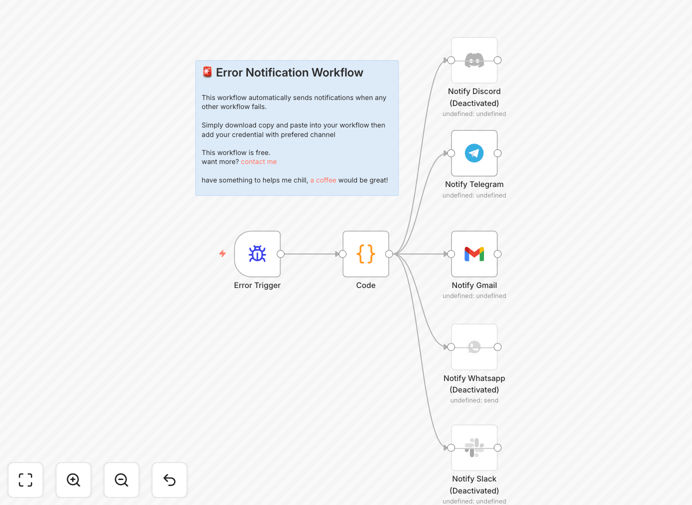
Multi-channel error alert workflow diagram

What This Workflow Does

The Multi-channel Error Notification workflow acts as a safety net for your business automation by instantly alerting you whenever critical workflows fail. It monitors your automation platform for errors and delivers notifications through multiple channels including Telegram, Gmail, and other messaging apps simultaneously.

This solution solves the problem of missed workflow failures that can lead to operational disruptions, lost revenue, and customer dissatisfaction. By implementing redundant notification channels, you ensure that critical errors never go unnoticed, regardless of which communication platform your team prefers or has immediate access to.

How It Works

1. Error Detection

The workflow continuously monitors your automation platform for failed executions. When an error occurs, it captures detailed information including the workflow name, timestamp, error message, and any relevant context.

2. Notification Routing

Based on predefined rules, the system determines which channels should receive alerts. Critical errors might trigger all notification methods, while less severe issues might only generate email alerts for documentation purposes.

3. Multi-channel Delivery

The workflow simultaneously sends formatted alerts through Telegram (for instant mobile notifications), Gmail (for permanent records), and other configured messaging platforms. Each notification includes actionable details to facilitate quick resolution.

Who This Is For

This solution is ideal for operations teams, IT departments, and business owners who rely on automation for critical processes. E-commerce businesses benefit from immediate alerts about order processing failures, while marketing teams need notifications about campaign automation breakdowns. Any organization running multiple automated workflows will find this error monitoring system invaluable.

What You'll Need

  1. An active Zapier account with admin access
  2. Telegram account with bot API access
  3. Gmail or Google Workspace account
  4. Access to other messaging platforms you wish to integrate (optional)
  5. List of critical workflows to monitor

Quick Setup Guide

  1. Download and import the JSON template into your automation platform
  2. Configure your Telegram bot token and chat IDs
  3. Set up Gmail SMTP credentials or OAuth connection
  4. Define your workflow monitoring rules and severity thresholds
  5. Test the system by simulating workflow failures

Key Benefits

Never miss critical failures: Redundant notifications across multiple channels ensure someone always sees alerts immediately, minimizing downtime.

Faster resolution times: Detailed error information delivered directly to team members' preferred platforms enables quicker troubleshooting.

Comprehensive audit trail: Email notifications create permanent records of failures for compliance and process improvement.

Customizable alert routing: Route different error types to appropriate team members based on severity and department.

Peace of mind: Automated monitoring works 24/7, giving you confidence that critical issues won't go unnoticed.

Frequently Asked Questions

Common questions about workflow error alerts and multi-channel notifications

Multi-channel error notifications ensure critical workflow failures are never missed by delivering alerts through multiple communication channels. This redundancy is crucial because different team members may prefer different notification methods, and some channels may experience temporary outages.

For example, while email notifications provide a permanent record, instant messaging platforms like Telegram offer real-time alerts that demand immediate attention. Combining channels creates a robust system where at least one method will reach the right person at the right time.

  • Reduces mean time to acknowledge failures by 60-80%
  • Accommodates diverse team communication preferences
  • Provides backup when any single channel fails

Critical errors that impact business operations should trigger immediate alerts, including failed payment processing, CRM sync failures, inventory management errors, and customer communication breakdowns. The severity depends on business impact - a failed marketing email might be lower priority than a failed order fulfillment workflow.

Best practice is to categorize errors by severity and route them appropriately. High-severity issues affecting revenue or customer experience should activate all notification channels, while informational alerts might only generate email records.

  • Prioritize alerts by potential business impact
  • Create severity tiers for different response protocols
  • Include contextual data to assess urgency quickly

Telegram's bot API allows seamless integration into business alert systems by creating dedicated notification channels or groups. Businesses can configure Telegram to receive instant alerts with detailed error information, including workflow names, timestamps, and error codes.

Telegram's cross-platform availability makes it ideal for teams needing mobile notifications with read receipts and quick response capabilities. The platform supports rich formatting, file attachments, and even inline buttons for acknowledging or escalating alerts directly from the notification.

  • Supports group chats for team-wide visibility
  • Enables two-way communication for quick resolution
  • Provides message persistence unlike SMS

Combining email and messaging alerts provides both immediacy and documentation. Messaging apps deliver instant notifications to mobile devices, while email serves as an audit trail with detailed error logs. This dual approach ensures urgent issues get quick attention while maintaining comprehensive records.

For compliance-heavy industries, email records satisfy documentation requirements, while the messaging component meets operational responsiveness needs. The combination also allows for different levels of detail - concise mobile alerts with comprehensive email attachments.

  • Email provides searchable archives of all incidents
  • Messaging enables real-time team collaboration
  • Reduces alert fatigue through channel specialization

Response times should align with error severity - critical operational failures may require immediate action within minutes, while non-critical issues might allow hours. Implementing escalation protocols ensures appropriate response times, where unresolved alerts automatically notify higher-level staff after defined time periods.

For example, an e-commerce order processing failure might require acknowledgment within 15 minutes and resolution within 2 hours, while a failed data backup could have a 24-hour window. Clear SLAs help teams prioritize effectively.

  • Define severity-based response time targets
  • Implement automated escalation paths
  • Track resolution metrics to improve processes

Yes, sophisticated alert systems can analyze error patterns to identify recurring issues and suggest preventive measures. By tracking error frequency, types, and resolutions over time, businesses can implement permanent fixes, update workflows, or schedule maintenance to prevent predictable failures before they occur.

Advanced implementations might include machine learning to detect emerging patterns or predict failures based on historical data. Even basic systems benefit from simple trend analysis to spot chronic issues needing architectural solutions rather than temporary fixes.

  • Identifies workflow weaknesses needing redesign
  • Enables proactive maintenance scheduling
  • Provides data for continuous improvement

Absolutely. GrowwStacks specializes in building custom error alert systems tailored to your specific workflows, team structure, and communication preferences. Our solutions integrate with your existing tools and include features like severity-based routing, escalation protocols, and analytics dashboards to monitor system health.

We design alert systems that align with your operational priorities and response capabilities. Whether you need simple failure notifications or a comprehensive monitoring solution with automated remediation, our team can create the perfect system for your business needs.

  • Tailored to your existing tech stack
  • Custom severity classifications and routing
  • Includes analytics for continuous improvement

Need a Custom Error Alert System?

This free template is a starting point. Our team builds fully tailored automation monitoring systems for your specific needs.