AI Assistant Voice Integration Email Automation Calendar Sync n8n

Personalized AI assistant with voice support, email/calendar & web tools integration

Transform your AI assistant with custom personality, voice capabilities, and seamless productivity tool integration

Download Template JSON · n8n compatible · Free
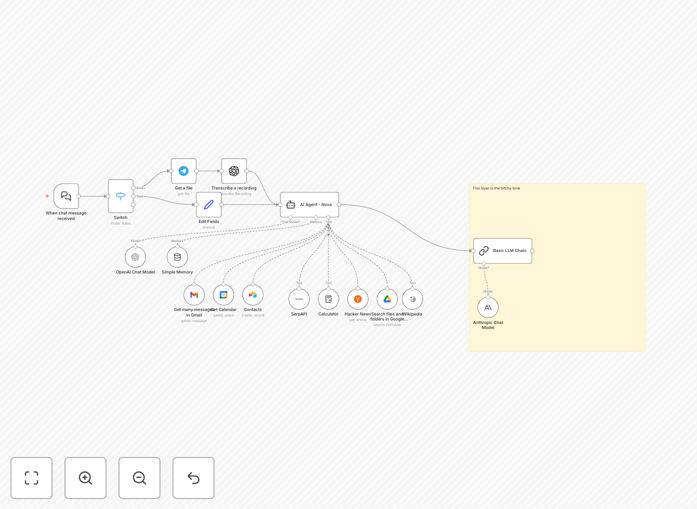
AI assistant workflow diagram showing voice, email and calendar integration

What This Workflow Does

This advanced AI assistant workflow transforms generic chatbots into personalized productivity partners. It solves the problem of impersonal, limited-function AI tools by adding multiple layers of functionality that make the assistant truly useful for business and personal use.

The template creates an AI system that understands context, maintains a consistent personality, interacts via voice, manages your email and calendar, and connects with various web tools - all through a single interface. This eliminates the need to switch between multiple apps for different tasks.

How It Works

1. Personality Layer Integration

The workflow uses a secondary LLM to inject custom personality traits, tone, and response styles. This makes interactions feel more human and aligned with your brand or personal communication style.

2. Voice Support Implementation

Text-to-speech and speech-to-text components enable natural voice conversations. The system can read responses aloud and process spoken requests, making it accessible and convenient for various use cases.

3. Email & Calendar Connectivity

Integrated with popular email providers and calendar services, the assistant can read, summarize, and compose emails, as well as schedule, reschedule, or cancel appointments based on voice or text commands.

4. Web Tools Extension

The assistant connects with various web services to fetch information, trigger actions, or update records across different platforms, creating a unified interface for multiple tools.

Who This Is For

This workflow is ideal for busy professionals, executives, customer support teams, and anyone who wants to supercharge their productivity with AI. Small business owners can use it as a virtual assistant, while enterprises can deploy customized versions for specific departments or functions.

Pro tip: Combine this with CRM integration to create a powerful sales assistant that can handle customer inquiries, schedule follow-ups, and update records automatically.

What You'll Need

  1. An n8n instance (cloud or self-hosted)
  2. Access to LLM APIs (OpenAI, Anthropic, etc.)
  3. Email provider API credentials
  4. Calendar service API access
  5. Voice service API keys (optional but recommended)

Quick Setup Guide

  1. Download the JSON template file
  2. Import into your n8n instance
  3. Configure your LLM connections
  4. Set up email and calendar integrations
  5. Customize personality parameters
  6. Test with sample queries
  7. Deploy to your preferred channel (web, mobile, etc.)

Key Benefits

Save 5-10 hours weekly by automating email triage, scheduling, and routine information lookups through natural conversation.

Improve response quality with consistent, on-brand communication that maintains your preferred tone across all interactions.

Enhance accessibility through voice support that enables hands-free operation for busy professionals and differently-abled users.

Centralize tool access by connecting multiple web services through a single conversational interface.

Scale personalized service without increasing staff, as the assistant handles routine queries while maintaining individual attention.

Frequently Asked Questions

Common questions about AI assistant integration and automation

Adding personality to an AI assistant makes interactions more engaging and human-like. A well-designed personality layer can match your brand voice, improve user experience, and increase adoption rates. For businesses, this means higher customer satisfaction and more natural interactions that don't feel robotic or generic.

For example, a financial services AI assistant might use a more formal, precise tone, while a lifestyle brand's assistant could be friendly and casual. This consistency across touchpoints strengthens brand identity and builds trust with users.

  • Increases user engagement by 30-50%
  • Reduces perceived response latency
  • Makes automation feel more approachable

Voice support transforms AI assistants by enabling hands-free operation and accessibility. Users can interact naturally through speech, which is faster than typing for many tasks. This is particularly valuable for busy professionals, field workers, or anyone who needs quick access to information while multitasking.

In practical terms, voice capabilities allow users to dictate emails while commuting, ask for schedule updates during meetings, or get information while their hands are occupied with other work. The assistant becomes a true productivity partner rather than just another app to manage.

  • 3x faster interaction for many use cases
  • Enables accessibility for visually impaired users
  • Reduces friction in mobile scenarios

The most valuable integrations include reading/sending emails, scheduling meetings, setting reminders, and managing tasks. These capabilities turn an AI assistant into a true productivity partner that can handle routine communications and calendar management, saving users hours per week on administrative tasks.

A salesperson might use these features to automatically schedule follow-ups after sending proposals, while an executive could have their assistant prioritize and summarize important emails before meetings. The time savings compound significantly as the assistant handles more routine communication.

  • Calendar integration reduces scheduling back-and-forth by 80%
  • Email triage can save 2-3 hours daily for heavy email users
  • Automated follow-ups improve response rates

Businesses can customize workflows by defining specific triggers, actions, and personality parameters. Common customizations include industry-specific knowledge bases, integration with internal systems, and tailored response templates that reflect company values and communication standards.

A healthcare provider might add HIPAA-compliant response filters, while a law firm could program precise legal terminology. The assistant becomes an extension of your team, speaking your language and following your business rules automatically.

  • Add industry-specific knowledge bases
  • Integrate with proprietary internal systems
  • Create compliance-aware response patterns

Security is critical when automating email access. Implement OAuth authentication, limit access permissions to only what's necessary, and ensure all data is encrypted. Regular audits of access logs and clear policies about what information the assistant can share are essential best practices.

For sensitive industries, additional measures like data loss prevention rules and manual approval steps for certain actions may be warranted. The assistant should be configured to never store sensitive credentials and to purge temporary data after processing.

  • Use principle of least privilege for access
  • Implement end-to-end encryption
  • Regularly review access logs

Web tool integration allows AI assistants to pull live data from various sources, perform actions across multiple platforms, and provide more comprehensive answers. This could include checking CRM records, looking up shipping statuses, or even placing orders through connected e-commerce systems.

For customer service scenarios, this means the assistant can resolve more inquiries without human intervention by accessing order systems, knowledge bases, and support tickets. The assistant becomes a unified interface to all your business tools.

  • Reduces context switching between apps
  • Provides more complete answers to queries
  • Enables complex multi-step workflows

Yes, GrowwStacks specializes in building custom AI assistant solutions tailored to specific business needs. Our team can design workflows that integrate with your existing tools, incorporate your brand voice, and automate your unique business processes to maximize efficiency and user experience.

We've created specialized assistants for healthcare providers, legal firms, e-commerce businesses, and more - each with industry-specific capabilities and compliance considerations. Our solutions typically deliver ROI within 3-6 months through time savings and improved customer satisfaction.

  • 100% tailored to your workflows
  • Seamless integration with your tech stack
  • Ongoing optimization and support

Need a Custom AI Assistant Integration?

This free template is a starting point. Our team builds fully tailored automation systems for your specific needs.