n8n File Processing Forms Binary Data Automation

Process multiple files with forms: a tutorial on binary data and loops

Automate document processing with form uploads and efficient binary data handling

Download Template JSON · n8n compatible · Free
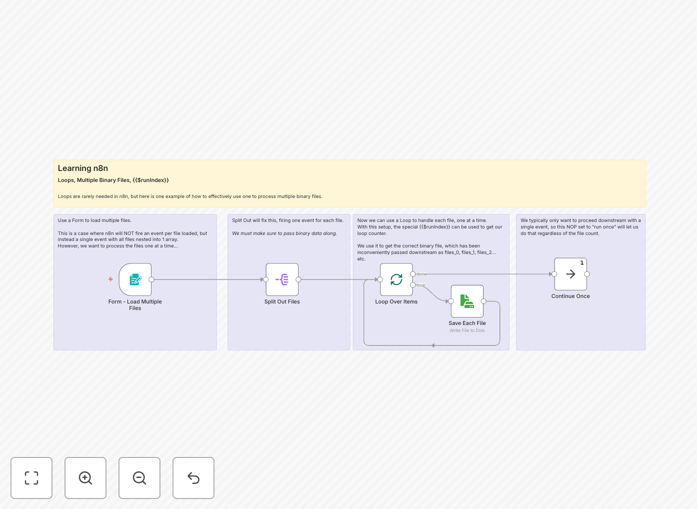
n8n workflow for processing multiple files with forms

What This Workflow Does

This n8n workflow solves a critical business challenge: efficiently processing multiple files uploaded through web forms while maintaining data integrity. Many organizations struggle with manual document handling, which is time-consuming and error-prone. The automation demonstrates professional-grade binary data handling that preserves file quality during processing.

The template provides a complete solution for collecting files through user-friendly forms, automatically processing each document through configured steps, and routing the results to appropriate destinations. It's particularly valuable for HR departments processing job applications, accounting teams handling invoices, or any scenario requiring standardized document collection and processing.

How It Works

1. Form Submission Trigger

The workflow begins when users submit files through a web form. The Form Trigger node captures all uploaded files along with any additional form data, maintaining the original file names and formats.

2. Binary Data Processing

Each file is handled as binary data, preserving the exact original content. The workflow includes proper MIME type detection and file size validation to ensure only permitted documents proceed through processing.

3. Automated File Looping

A Loop node automatically processes each uploaded file individually, applying the same set of actions to every document. This maintains consistency while allowing for conditional logic based on file types or content.

4. Conditional Processing Paths

Based on file types or content analysis, documents can be routed through different processing branches. PDFs might go through text extraction while images undergo resizing, all within the same automated workflow.

5. Output and Notifications

Processed files are saved to designated locations (cloud storage, databases, etc.) and confirmation notifications are sent to both users and administrators, completing the automated document handling cycle.

Pro tip: Add virus scanning to your file processing workflow by integrating with services like VirusTotal before handling the documents.

Who This Is For

This workflow template benefits any organization that regularly collects and processes documents from multiple users. HR teams can automate resume processing, educational institutions can handle assignment submissions, and service businesses can streamline client document collection. It's particularly valuable for:

  • Recruitment agencies processing hundreds of applications
  • Accounting departments handling vendor invoices
  • Legal firms collecting client documentation
  • Educational platforms managing student submissions
  • Media companies accepting content uploads from contributors

What You'll Need

  1. An n8n instance (cloud or self-hosted)
  2. Basic understanding of n8n interface
  3. Destination configured for processed files (Google Drive, Dropbox, etc.)
  4. Optional: Web server for hosting the form if not using n8n's built-in option

Quick Setup Guide

  1. Download the JSON template file
  2. In your n8n dashboard, import the workflow
  3. Configure the Form Trigger node with your desired fields
  4. Set up your file processing steps (modify as needed)
  5. Connect output nodes to your storage destinations
  6. Test with sample files to verify processing
  7. Deploy your form and monitor the workflow

Key Benefits

Reduce manual document handling by 80-90%: Automating file processing eliminates the most time-consuming aspect of document workflows, allowing staff to focus on higher-value tasks.

Ensure consistent processing for all files: Every document goes through the exact same quality-controlled steps, eliminating human error and variation in manual handling.

Scale to handle volume spikes effortlessly: The automated system can process 10 or 10,000 files with equal reliability, perfect for seasonal business needs or growth periods.

Improve data security and compliance: Automated workflows enforce consistent security measures like access controls and audit trails that are difficult to maintain manually.

Gain processing insights through logging: Detailed logs provide visibility into document processing times, success rates, and bottlenecks for continuous improvement.

Frequently Asked Questions

Common questions about file processing automation and form integrations

Binary data processing refers to handling files (like images, PDFs, or documents) in their raw format within automation workflows. Unlike text data, binary requires special handling to maintain file integrity during transfers. This workflow demonstrates how to properly process uploaded files through forms while preserving their original quality and format.

When users upload files through forms, the data arrives as binary streams. The workflow maintains this format throughout processing rather than converting to text, which is crucial for maintaining image quality, PDF formatting, and other file-specific characteristics that would be lost in text conversion.

  • Preserves original file quality and formatting
  • Essential for images, PDFs, and specialized formats
  • Requires different handling than text-based data

Multi-file processing automates document-heavy workflows like invoice processing, application reviews, or media uploads. Businesses handling bulk files save 70-90% of manual processing time. For example, HR teams can process hundreds of job applications simultaneously rather than reviewing each file individually, dramatically improving hiring efficiency.

The automation ensures consistent handling of each document while eliminating repetitive manual steps. A law firm might receive hundreds of client documents daily - manual processing would require opening each file individually, while automation handles them in batches with uniform quality control measures applied to every document.

  • Eliminates repetitive manual file handling
  • Ensures consistent processing standards
  • Scales effortlessly with business growth

Loops automatically repeat actions for each file in a batch. When a form receives multiple uploads, the workflow processes each file sequentially through the same steps. This ensures consistent handling while eliminating repetitive manual work. Each iteration can apply transformations, extract data, or route files based on their content.

In practice, a loop might resize each product image to three different dimensions, then upload all versions to a CDN. The automation handles the repetitive work while maintaining quality standards across all files. Loops can also include conditional logic - for example, routing PDFs to text extraction while sending images to a resizing process.

  • Processes each file through identical steps
  • Maintains processing consistency
  • Can include conditional branching

Secure file processing requires validation checks, virus scanning, and access controls. The workflow should verify file types, sizes, and scan for malware before processing. Temporary storage with automatic deletion protects sensitive data. Encryption during transfer and strict permission settings prevent unauthorized access to uploaded documents.

A healthcare portal handling patient records would implement additional safeguards like automatic redaction of sensitive information and audit logging of all file access. The workflow might convert uploaded files to standardized formats to eliminate potential malicious code hidden in original documents while preserving the informational content.

  • Validate file types and sizes
  • Scan for viruses and malware
  • Implement access controls and encryption

Yes, advanced workflows can handle mixed file types by branching logic based on file extensions. For example, a workflow might extract text from PDFs while resizing images and parsing spreadsheet data. Conditional routing ensures each file type gets appropriate processing while maintaining a unified upload interface for users.

A marketing team might accept campaign assets including images, videos, and text documents through one form. The workflow automatically routes each file type through appropriate optimization processes before assembling the final campaign package. This eliminates manual sorting while ensuring each asset gets professional treatment.

  • Route files by type to specialized processing
  • Maintain single upload interface
  • Apply format-specific optimizations

Common applications include job application systems, document submission portals, media uploads for content platforms, and invoice processing. Educational institutions use them for assignment submissions, while healthcare providers collect patient forms. Any scenario requiring standardized document collection benefits from automated form uploads with processing.

Real estate agencies process property documents, insurance companies handle claim evidence, and publishers manage contributor submissions - all through customized file upload workflows. The automation ensures consistent handling regardless of volume spikes, with the added benefit of automatic notifications and status updates for submitters.

  • Standardizes document collection
  • Handles volume fluctuations
  • Provides submitter feedback

Absolutely. GrowwStacks specializes in building tailored file processing systems for specific business needs. Whether you need custom validation rules, integration with existing systems, or specialized document handling, our team can design a solution that fits your exact requirements and scales with your operations.

We've developed custom solutions for healthcare compliance documentation, legal case file management, and media asset processing pipelines. Each implementation considers your unique workflow requirements, security standards, and integration points with other business systems to create a seamless document handling ecosystem.

  • Tailored to your specific document types
  • Integrated with your existing systems
  • Scalable for business growth

Need a Custom File Processing Integration?

This free template is a starting point. Our team builds fully tailored automation systems for your specific needs.