What This Workflow Does
Manual WordPress publishing consumes hours of valuable time—uploading images, formatting content, adding internal links, and updating tracking sheets. This automation eliminates those repetitive tasks by creating a complete end-to-end publishing pipeline.
The workflow receives blog content from your writing automation, enhances it with AI-generated branded images, inserts intelligent internal links based on target keywords, publishes to WordPress with proper categories, updates tracking sheets, and sends client notifications—all without manual intervention.
Perfect for marketing agencies, content teams, and SEO specialists managing multiple client blogs who need consistent, brand-aligned publishing at scale while maintaining detailed reporting and SEO best practices.
How It Works
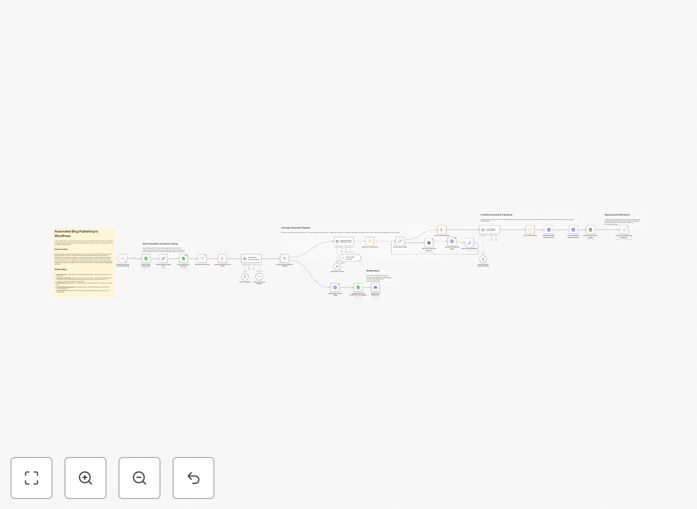
1. Content Reception & Configuration
The workflow triggers when your blog writing automation completes. It loads client-specific settings from Google Sheets, including WordPress API credentials, brand colors, image preferences, and category mappings.
2. Intelligent Internal Linking
Using Google Gemini AI, the system analyzes your target keywords and existing site content to insert up to three contextual anchor links. This improves SEO site architecture automatically while maintaining natural reading flow.
3. AI Image Generation & Branding
OpenAI's DALL-E creates three branded images: a featured thumbnail with overlay text and two supporting content images. All visuals match your brand colors and style guidelines, eliminating stock photo searches.
4. WordPress Media Upload & Insertion
Images upload automatically to the WordPress media library. Gemini AI then intelligently places them at optimal positions within the article while preserving your HTML structure and newly added anchor links.
5. Automated Publishing & Tracking
The complete blog publishes via WordPress REST API with proper categories and featured image set. Google Sheets updates with the live URL and publish date, while Discord notifications alert project managers.
6. Client Reporting & Handoff
The workflow triggers your reporting automation to send polished updates to clients via email, Slack, or WhatsApp—closing the loop with professional communication.
Who This Is For
Marketing Agencies: Manage 10+ client WordPress sites with different brand guidelines from a single automation dashboard.
Content Teams: Eliminate 2-3 hours of manual work per blog while ensuring consistent formatting and SEO optimization.
SEO Specialists: Guarantee proper internal linking and category assignment across all published content without manual review.
Freelance Writers: Offer premium "publish-ready" blog services including branded imagery without design skills.
SaaS Companies: Maintain consistent publishing schedules across multiple product blogs with automated tracking.
What You'll Need
- Active n8n instance (self-hosted or n8n Cloud)
- WordPress site with REST API enabled and authentication tokens
- Google Sheets with OAuth access for project management
- OpenAI API key for DALL-E image generation
- Google Gemini API key for content processing
- Discord bot (optional, for team notifications)
- Blog content creation workflow (to trigger this publishing automation)
Pro tip: Create a master Google Sheet with client configurations before setup. Include columns for brand colors (hex codes), WordPress category IDs, image style preferences, and reporting contacts. This central configuration makes scaling to multiple clients effortless.
Quick Setup Guide
- Add credentials in n8n: Connect Google Sheets, WordPress, OpenAI, and Gemini APIs in your n8n credentials manager.
- Configure your Project Central Sheet: Create a Google Sheet with client configurations as described in the template documentation.
- Set up client tracking sheets: Create individual sheets for each client with keyword targets and content tracking columns.
- Test WordPress authentication: Verify REST API access and token permissions work correctly.
- Connect to your content workflow: Ensure your blog creation automation triggers this publishing workflow with the required data fields.
- Run a test publication: Publish a sample blog to verify images generate, links insert, and tracking updates correctly.
Key Benefits
Save 2-3 hours per blog publication by eliminating manual image creation, formatting, linking, and tracking updates. What previously required multiple tools and manual steps now happens automatically.
Improve SEO performance consistently with automated internal linking that follows best practices. Every published article connects to relevant existing content, strengthening your site architecture without manual keyword research.
Maintain brand consistency across all content with AI-generated images that match your color palette and style guidelines. No more inconsistent stock photos or design variations between different team members.
Scale multi-client operations effortlessly using centralized configuration management. Add new client WordPress sites by simply adding rows to your Google Sheet—no code changes required.
Provide transparent client reporting with automated updates in their preferred communication channels. Clients receive professional notifications with live links and publication details without manual follow-up.