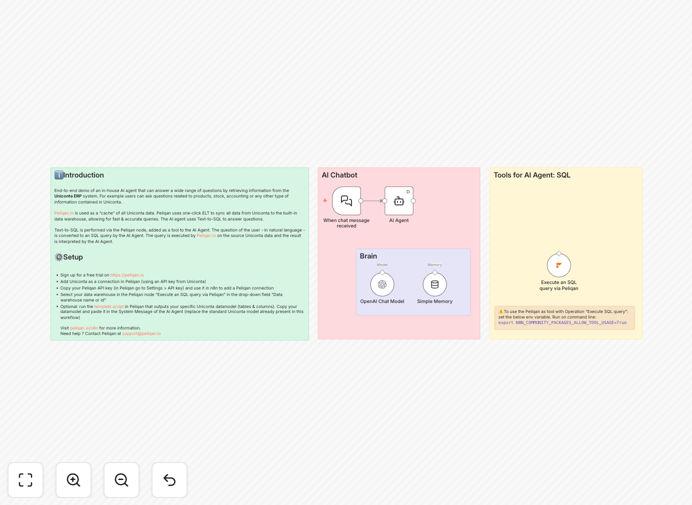
What This Workflow Does
This automation creates an intelligent chatbot interface for your Uniconta ERP system, allowing employees to ask business questions in natural language and receive accurate answers by querying live ERP data. Instead of running complex reports or navigating multiple screens in Uniconta, users get instant answers about inventory levels, financial KPIs, order statuses, and other operational data.
The workflow connects three powerful technologies: Uniconta (your ERP system), Peliqan (the data integration platform), and OpenAI (the AI processing engine). When a question comes in, the system intelligently determines which Uniconta data tables to query, retrieves the relevant information through Peliqan's API, and uses AI to formulate a clear, conversational response.
How It Works
1. User submits a business question
The workflow begins when an employee or manager asks a question through your preferred interface (Slack, Teams, web portal, etc.). Example questions might include "What's our current inventory level for product X?" or "Which customers have overdue invoices?"
2. AI analyzes the question intent
OpenAI's natural language processing determines what data needs to be retrieved from Uniconta. The AI identifies entities (like product names or date ranges) and maps them to specific Uniconta data tables and fields through Peliqan's integration layer.
3. Peliqan queries Uniconta ERP
Peliqan securely connects to your Uniconta instance and retrieves only the relevant data needed to answer the question. This happens through Uniconta's API with proper authentication and access controls.
4. AI formulates the response
The raw data from Uniconta is processed by OpenAI to create a natural language answer that's easy to understand. The AI adds context where helpful, like comparing current numbers to historical averages when discussing sales figures.
5. Response delivered to user
The final answer is returned through the original interface where the question was asked, completing the conversational loop. The system can optionally log all queries and responses for auditing purposes.
Who This Is For
This solution is ideal for Uniconta users across various departments who need quick access to ERP data without technical expertise. Operations managers can check inventory or production statuses. Finance teams can query accounts receivable or expense data. Sales teams can look up customer order histories. Executives can get summarized KPIs on demand.
What You'll Need
- An active Uniconta ERP system with API access enabled
- Peliqan account with Uniconta integration configured
- OpenAI API key (GPT-3.5 or GPT-4)
- n8n instance (self-hosted or cloud)
- Interface platform for chatbot (Slack, Teams, web app, etc.)
Quick Setup Guide
- Download and import the JSON template into your n8n instance
- Configure the Peliqan credentials with your Uniconta connection details
- Add your OpenAI API key in the appropriate workflow nodes
- Set up your preferred chat interface (webhook URL for Slack/Teams, etc.)
- Test with sample questions and adjust data mapping as needed
- Deploy to production and train users on question phrasing best practices
Key Benefits
80% faster access to ERP data compared to manual report generation. Employees get answers in seconds instead of waiting for IT to run specialized queries.
Reduces ERP training requirements by letting users ask questions naturally instead of learning complex navigation paths in Uniconta.
Improves decision velocity with instant access to current operational data. Managers can respond to issues before they escalate.
Scales across departments without additional ERP licenses, since the chatbot serves as a unified access point.
Future-proofs your ERP investment by adding modern AI capabilities to your existing Uniconta implementation.
Pro tip: Start with a limited set of question types (inventory, orders, basic financials) before expanding to more complex queries. This helps refine the AI's understanding of your business terminology.