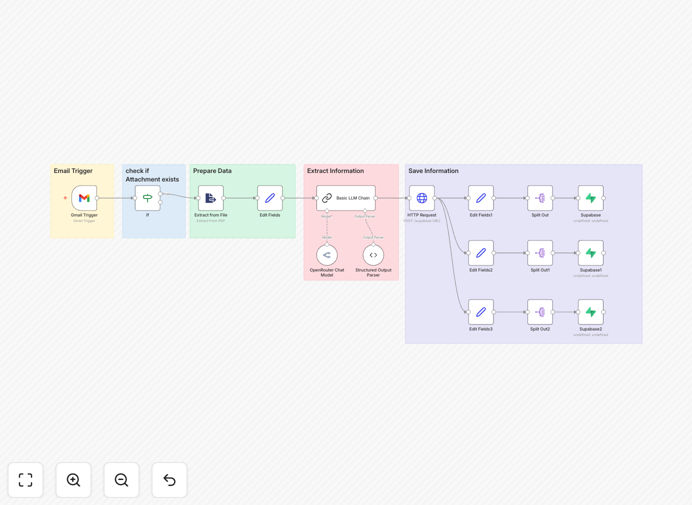
What This Workflow Does
This n8n workflow automates the tedious process of extracting candidate information from resumes received via email. It monitors your designated email inbox for attachments, processes PDF or Word documents, extracts structured data like skills, experience, and education, then stores everything in your Supabase database.
Recruitment teams waste countless hours manually reviewing resumes and entering data into their systems. This workflow eliminates that manual work while ensuring consistent, searchable candidate records. The parsed data becomes immediately available for screening, reporting, and integration with other HR tools.
How It Works
1. Email Monitoring
The workflow checks your specified email account for new messages with attachments at regular intervals. It filters for messages matching your criteria (like specific subject lines or senders) to avoid processing irrelevant emails.
2. Attachment Processing
When a qualifying email is found, the workflow downloads the attached resume file. It supports multiple file formats including PDF, DOC, and DOCX. The system can handle multiple attachments in a single email, processing each one sequentially.
3. Data Extraction
Using advanced parsing logic, the workflow analyzes the resume document to identify and extract key candidate information. This includes contact details, work history, education, skills, and other relevant sections. The parser normalizes data like dates and job titles for consistency.
4. Supabase Storage
The extracted data is structured into a consistent format and saved to your Supabase database. The workflow creates or updates candidate records, maintaining data integrity. All information is stored in searchable fields for easy retrieval and reporting.
5. Notification & Logging
After processing, the workflow can notify your team via email or Slack about new candidate additions. It also maintains detailed logs of processing attempts, successes, and any issues encountered for troubleshooting.
Who This Is For
This workflow is ideal for:
- Recruitment agencies processing high volumes of resumes
- HR teams at growing companies
- Startups building their own lightweight ATS
- Tech companies that want direct database access to candidate data
- Teams using Supabase who need structured candidate records
Pro tip: Combine this with our interview scheduling workflow to create a complete recruitment automation system.
What You'll Need
- An n8n instance (cloud or self-hosted)
- A Supabase project with database setup
- Email account credentials for monitoring
- Basic understanding of n8n workflows
- Database table structure for storing candidate data
Quick Setup Guide
- Download the template JSON file
- Import into your n8n instance
- Configure your email account credentials
- Set up your Supabase connection details
- Map the extracted fields to your database columns
- Test with sample resumes
- Activate the workflow
Key Benefits
Reduce manual data entry by 90%: Automatically capture candidate details without copying and pasting from resumes.
Speed up screening processes: Have all candidate data searchable and filterable within minutes of application.
Improve data consistency: Standardized parsing eliminates variations in how different team members might record the same information.
Enable better reporting: Structured data allows for analytics on candidate pools, skills availability, and hiring funnel metrics.
Scale your hiring efforts: Handle increasing application volumes without proportional increases in administrative work.