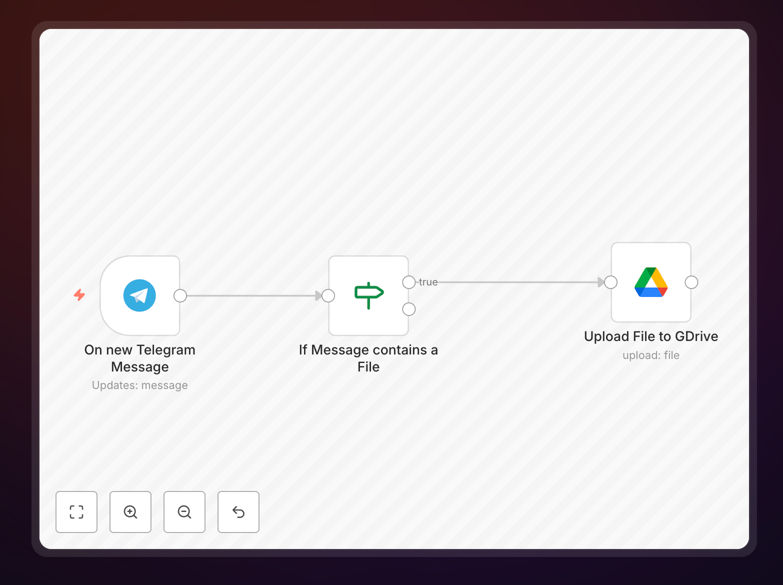
What This Workflow Does
This automation solves the common problem of losing important files shared through Telegram chats. Instead of manually downloading each document, photo, or media file, this workflow automatically saves everything to your Google Drive as soon as it arrives in any Telegram chat.
The system monitors your Telegram account continuously, detecting new files the moment they're shared. It then uploads them to a designated Google Drive folder while preserving the original file names and formats. This creates a secure, searchable archive of all your Telegram files in the cloud.
How It Works
1. Telegram Trigger Setup
The workflow begins by connecting to your Telegram account through its official API. It continuously monitors your specified chats (or all chats) for new file attachments.
2. File Detection and Processing
When a new file appears in any monitored chat, the automation immediately captures its details including file type, name, size, and sender information. The system can filter files by type if you only want to backup specific formats.
3. Google Drive Upload
The workflow then connects to your Google Drive account and uploads the file to your specified folder. You can configure the destination path, naming conventions, and organizational structure.
Who This Is For
This automation is ideal for businesses and professionals who frequently receive important files through Telegram. Marketing teams getting client assets, remote teams sharing documents, or customer support agents receiving order details can all benefit from automatic backups.
Freelancers and solopreneurs who use Telegram for client communications will appreciate never losing contracts, invoices, or project files. Educators receiving student assignments and community managers handling group shares will save hours of manual file management.
What You'll Need
- A Telegram account with files you want to backup
- A Google Drive account with storage space available
- An n8n account (free or paid) to host the workflow
- API access enabled for both Telegram and Google Drive
Quick Setup Guide
- Download the JSON template file
- Import it into your n8n instance
- Connect your Telegram account in the first node
- Connect your Google Drive account in the upload node
- Specify your destination folder path in Google Drive
- Activate the workflow and test with a new Telegram file
Pro tip: Create separate Google Drive folders for different Telegram chats or file types to maintain organization as your archive grows.
Key Benefits
Never lose important files - Automatic backups ensure documents, photos, and media shared via Telegram are safely archived regardless of what happens to your device.
Save 2-5 hours weekly - Eliminate manual downloading and uploading of files from Telegram chats, freeing up significant time for more valuable work.
Centralized access - Team members can find all Telegram-shared files in one Google Drive location instead of searching through multiple chats.
Version control - Google Drive maintains file history, allowing you to recover previous versions if a shared document gets accidentally modified.
Scalable solution - The workflow handles hundreds of files daily without additional effort, growing with your communication volume.