What This Workflow Does
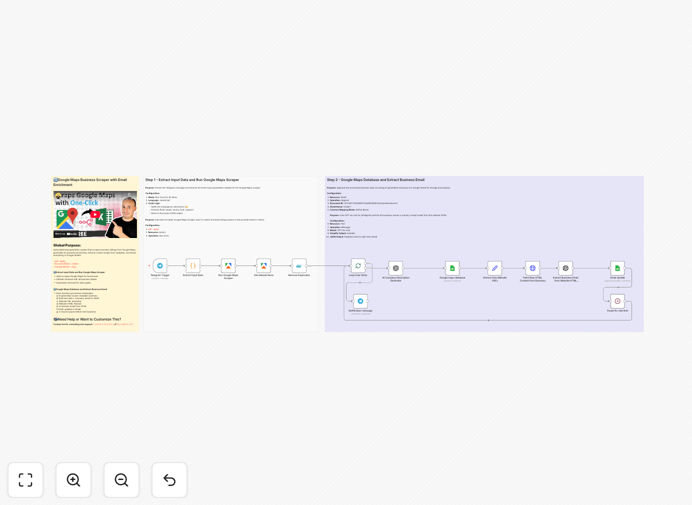
This automation solves the time-consuming problem of manual business prospecting. Instead of spending hours searching Google Maps, copying business details, and researching websites for contact information, this workflow does it all automatically. It identifies potential clients in your target location and industry, extracts their public information, enriches it with AI, and organizes everything into a ready-to-use Google Sheet.
The system is designed for sales teams, marketers, and agencies who need to build qualified lead lists quickly. It handles everything from initial search to final data organization, ensuring you get clean, actionable prospect information without manual effort. The workflow is GDPR-compliant and focuses on B2B outreach using publicly available business data.
How It Works
1. Trigger via Telegram
You send a simple message to your Telegram bot specifying the business type, number of leads needed, and Google Maps search URL. This initiates the automation without needing to log into any dashboard.
2. Google Maps Data Collection
The workflow uses Apify's Google Maps Scraper to extract publicly listed business information including names, addresses, phone numbers, websites, and categories. It respects rate limits and collects data ethically from Google's public listings.
3. Duplicate Removal & Data Cleaning
Before processing, the system removes duplicate entries and standardizes data formats. This ensures your final list contains unique, properly formatted business information ready for enrichment.
4. AI-Powered Business Summarization
GPT-4 analyzes each business website (when available) to generate concise summaries. This helps your sales team understand what each company does without manually visiting their site, saving research time.
5. Professional Email Extraction
The AI scans business websites to find professional email addresses that aren't always listed on Google Maps. It looks for contact pages, about sections, and footer information to identify the best email addresses for outreach.
6. Google Sheets Integration
All enriched data automatically populates a Google Sheet with columns for business name, category, address, phone, website, AI summary, and extracted email. The sheet is organized and ready for your sales team to use immediately.
7. Completion Notification
You receive a Telegram notification when all businesses have been processed, along with a link to your completed Google Sheet. The entire process runs unattended once triggered.
Who This Is For
This automation is ideal for B2B sales teams, marketing agencies, local service providers, SaaS companies, and anyone who needs to build targeted prospect lists. It's particularly valuable for businesses that sell to specific industries or geographic areas, franchise development teams, and consultants looking to expand their client base.
If you're currently spending more than 5 hours per week on lead research or if your sales team complains about poor lead quality, this workflow can transform your prospecting process. It's also perfect for startups and small businesses that need to scale their outreach without hiring additional researchers.
What You'll Need
- n8n instance (cloud or self-hosted)
- Telegram Bot token (free from BotFather)
- Apify account with API access
- Google account for Sheets integration
- OpenAI API key for GPT-4 email extraction
- Google Maps search URL for your target area and business type
Pro tip: Start with a small test search (5-10 businesses) to verify everything works before scaling to larger lists. This helps you understand the data quality and adjust parameters if needed.
Quick Setup Guide
- Import the template into your n8n instance using the downloaded JSON file.
- Configure Telegram credentials in the trigger node using your BotFather token.
- Connect your Apify account in the Google Maps Scraper node with your API key.
- Set up Google Sheets connection and specify your target spreadsheet name.
- Add your OpenAI API key to both AI nodes for summarization and email extraction.
- Test the workflow by sending a Telegram message with your search parameters.
- Monitor the first run to ensure data flows correctly through all steps.
- Schedule regular runs or set up triggers for ongoing lead generation.
Key Benefits
Save 10-20 hours per week on lead research. What used to take days of manual searching now happens automatically while you focus on closing deals.
Improve lead quality with AI enrichment. Get business summaries and professional emails that manual researchers often miss, increasing response rates.
Scale prospecting without adding staff. Process hundreds of leads with the same effort as manually researching a dozen, perfect for growing businesses.
Maintain organized, searchable prospect databases. All data lands in Google Sheets where you can filter, sort, and segment leads for targeted campaigns.
Stay compliant with ethical data practices. The workflow uses only publicly available information and respects platform terms of service.