Google Calendar Slack Daily Digest n8n

Send a daily summary of your Google Calendar events to Slack

This automation workflow triggers each morning to fetch your day's schedule from Google Calendar and posts a clean summary message in Slack. Never manually type out your schedule again.

Download Template JSON · Zapier compatible · Free
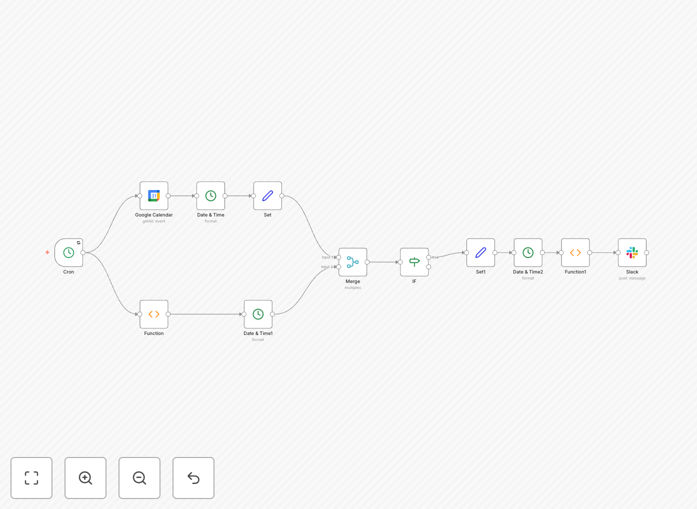
Screenshot of n8n workflow sending calendar events to Slack

What This Workflow Does

This automation solves the problem of manually sharing your team manually checking calendars or typing out daily schedules in Slack. It automatically compiles all your Google Calendar events for the current day formats them into a clean, readable summary, and posts it to your designated Slack channel every morning.

For busy professionals and teams, this eliminates the need to switch between checking calendars and communicating schedules. The workflow runs reliably at 6am each day, ensuring everyone starts their day with clear visibility of meetings, deadlines, and important events.

How It Works

1. Daily Trigger

The workflow activates automatically each morning at 6am using n8n's scheduler. This consistent timing ensures the summary arrives before the workday begins.

2. Calendar Event Retrieval

The system connects to your Google Calendar account via API and fetches all events scheduled for the current day. It handles authentication securely and only accesses calendar data you've permitted.

3. Event Processing

The raw calendar data gets transformed into a clean, readable format. The workflow extracts key details like event titles, times, attendees, locations, and attendees while removing unnecessary metadata.

4. Slack Notification

The formatted summary is sent to your specified Slack channel with a formatted message showing all events. The message includes emoji indicators for meeting types and clickable links when available.

Pro tip: Customize the message format in the workflow to match your team's brand voice by adding your company logo or specific formatting requirements.

Who This Is For

This automation benefits anyone who needs to share their daily schedule with colleagues or team members regularly. Perfect for:

  • Executives and managers who want to keep their teams informed
  • Remote teams coordinating across time zones
  • >Sales professionals with back-to-back client meetings
  • Project managers tracking milestones and deadlines
  • Support teams managing multiple calendars

What You'll Need

  1. A Google Calendar account with events to share
  2. Slack workspace with appropriate permissions
  3. n8n instance (cloud or Zapier account
  4. 5 minutes to set up the workflow

Quick Setup Guide

  1. Download the template file
  2. Import it into your n8n or Zapier account
  3. Connect your Google Calendar and accounts
  4. Specify which calendar and Slack channel to use
  5. Set your preferred Slack channel
  6. Test and activate the workflow

Pro tip: Create a dedicated #daily-schedule channel in Slack to keep these summaries rather than cluttering general channels.

Key Benefits

Save Save 15+ minutes daily by eliminating manual calendar sharing. This workflow automates what would otherwise be a time-consuming morning routine.

Improve team alignment with automatic visibility into your schedule. Colleagues can better plan around your availability.

Reduce scheduling conflicts by making your availability transparent. Team members can plan around your existing commitments.

Maintain consistency with perfectly formatted summaries sent at the same time every day, regardless of how busy you are.

Customizable output lets you control exactly what information gets shared and how it's presented to your team.

Frequently Asked Questions

Common questions about Google Calendar and Slack integration

Automating calendar summaries saves time by eliminating manual copying of events into Slack. Teams gain visibility into schedules without switching apps, reducing missed meetings and improving coordination.

For example, a marketing team can instantly see when campaign deadlines are approaching without checking multiple calendars. This prevents last-minute rushes faster decision-making and alignment.

  • Reduces context switching between apps
  • Provides real-time coordination
  • Creates shared awareness of priorities

Google Calendar and Slack integration creates a centralized hub for team scheduling. Benefits include automatic notifications for meetings, shared visibility into availability, and reduced email clutter.

Sales teams particularly benefit by seeing when client calls are scheduled directly in their communication hub.

  • Eliminates duplicate calendar invites in email threads about scheduling
  • Provides real-time updates when changes occur
  • Integrates scheduling with existing workflows

Focus on events that impact team coordination - meetings, deadlines, client calls, and milestones. Personal appointments can be excluded unless they affect availability.

A development team might include sprint deadlines but omit lunch breaks. The key is sharing what colleagues need to know to collaborate effectively.

  • Prioritize events involving multiple people
  • Include deadlines affecting workflow
  • Exclude personal appointments unless they block availability

Daily morning summaries work best for most teams, providing a fresh overview each workday. High-velocity teams might benefit from additional midday updates.

The frequency should match your team's pace - daily for most, twice daily for fast-moving operations like customer support or newsrooms.

  • Morning summaries help plan the day ahead
  • Additional updates may help teams with shifting priorities
  • Avoid over-notification that creates alert fatigue

Yes, workflows can route different event types to relevant channels. Marketing meetings could go to #marketing while product deadlines route to #dev-team.

This customization ensures each department sees only relevant calendar items, reducing noise in general channels while maintaining transparency where it matters most.

  • Route client meetings to sales channels
  • Send project deadlines to team-specific channels
  • Keep executive updates separate from operational schedules

Only share necessary event details in Slack channels. Use private channels. Use private channels for sensitive meetings.

The workflow should exclude confidential calendar entries. Always review event visibility settings in Google Calendar before automation to automation.

  • Never automate fully private calendar entries
  • Consider creating a separate calendar for shared team calendar
  • Review Slack channel permissions before automation

Absolutely! GrowwStacks specializes in tailored calendar automations. We can create workflows with filtering, multiple channel routing, and conditional formatting based on your team's needs.

Our experts will handle the technical setup while you focus on your business. We've built custom integrations for teams ranging from small startups to Fortune 500 companies.

  • Custom event filtering and prioritization
  • Multi-channel routing logic
  • Advanced formatting and branding options

Need a Custom Calendar-to-Slack Integration?

This free template is a starting point. Our team builds fully tailored automation systems for your specific needs.