What This Workflow Does
Every recruiter knows the frustration: you send application links to promising candidates, but many never complete them. Manual follow-up is time-consuming, inconsistent, and easy to forget. This automation solves that by turning your Airtable recruitment base into an intelligent reminder system.
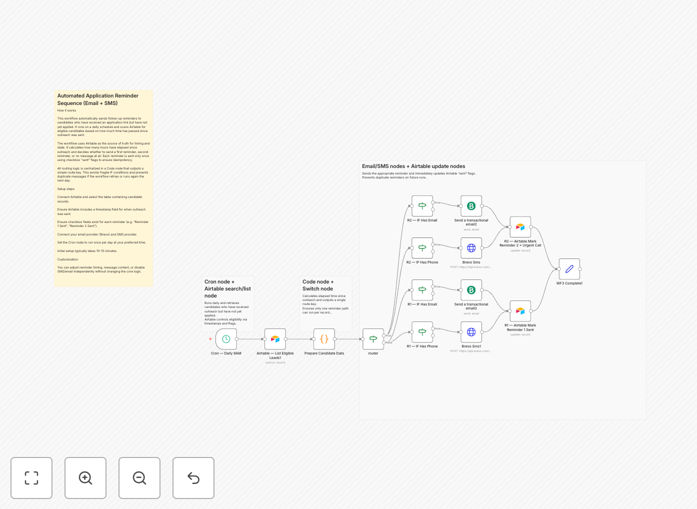
The workflow runs daily, checking for candidates who received outreach but haven't applied. It calculates how much time has passed and decides whether to send a first reminder (email), a second reminder (SMS), or no message yet. All decision logic is centralized in one place, making it easy to understand and modify. Most importantly, it updates Airtable with "sent" flags so you never send duplicate reminders and have complete visibility into your follow-up process.
How It Works
The automation follows a clear, logical sequence that mimics how a thoughtful recruiter would manually follow up, but with perfect consistency and timing.
1. Daily Schedule Trigger
A schedule node runs the workflow once per day at your chosen time (e.g., 9 AM). This ensures reminders go out at appropriate business hours without you lifting a finger.
2. Fetch Candidate Records from Airtable
The workflow queries your Airtable base for candidates where: outreach has been sent, application is not yet completed, and reminders haven't already been sent. It filters to only those needing attention today.
3. Calculate Timing & Decide Action
A central Code node examines each candidate's "outreach sent" timestamp. If it's been 2-3 days, route to "first reminder." If it's been 5-6 days and first reminder was sent, route to "second reminder." Otherwise, take no action. This clean routing prevents complex conditional spaghetti.
4. Send Email & SMS Reminders
For first reminders, personalized emails are sent via your connected email service (like Brevo). For second reminders, concise SMS messages are dispatched via your SMS gateway. Templates are fully customizable with candidate names and specific application links.
5. Update Airtable Status
Immediately after sending each reminder, the workflow updates the candidate's record in Airtable with the appropriate "Reminder Sent" checkbox. This maintains data integrity and provides your team with a real-time dashboard of follow-up status.
Who This Is For
This template is ideal for recruitment agencies, in-house talent acquisition teams, hiring managers, and anyone managing candidate pipelines. If you send more than 10 application links per week and find yourself manually chasing candidates, this automation will save you significant time. It's particularly valuable for high-volume roles, internship programs, or any situation where application completion rates directly impact hiring success.
Pro tip: Combine this with an initial "application received" confirmation automation to create a complete candidate communication suite that improves experience from first contact to hire.
What You'll Need
- Airtable Base: With candidate records containing: Name, Email, Phone, "Outreach Sent" timestamp, "Application Completed" checkbox, and "Reminder 1/2 Sent" checkboxes.
- Email Service Account: Like Brevo (Sendinblue), SendGrid, or Amazon SES with API access.
- SMS Gateway Account: Such as Twilio, MessageBird, or a similar provider with API capabilities.
- n8n Instance: Either self-hosted or n8n.cloud account with available workflow execution.
- Basic Understanding: Of how to import JSON workflows and configure node credentials in n8n.
Quick Setup Guide
You can have this automation running in under 15 minutes by following these steps:
- Download & Import: Click the download button above to get the JSON file. In your n8n instance, create a new workflow and use the "Import from File" option to load it.
- Connect Airtable: Edit the Airtable node, add your credentials, and select your base and table. Map the field names to match your Airtable structure.
- Configure Email & SMS: Add credentials for your email and SMS services in their respective nodes. Customize the message templates with your branding and preferred wording.
- Set Schedule: Adjust the Schedule Trigger node to run at your preferred time (daily at 9 AM is typical).
- Test & Activate: Run the workflow once manually with a test record to verify everything works. Then activate it and let it run automatically.
Key Benefits
Increase application completion rates by 25-40%. Timely, personalized reminders significantly reduce candidate drop-off between outreach and submission.
Save 5-10 hours per week per recruiter. Eliminate manual follow-up tasks, calendar reminders, and spreadsheet tracking entirely.
Improve candidate experience with consistent communication. Candidates appreciate timely nudges and are more likely to view your organization positively.
Maintain perfect data integrity in Airtable. Automatic status updates mean your recruitment dashboard is always accurate and actionable.
Scale your hiring process without adding overhead. Handle 10 or 1000 candidates with the same efficiency and personal touch.