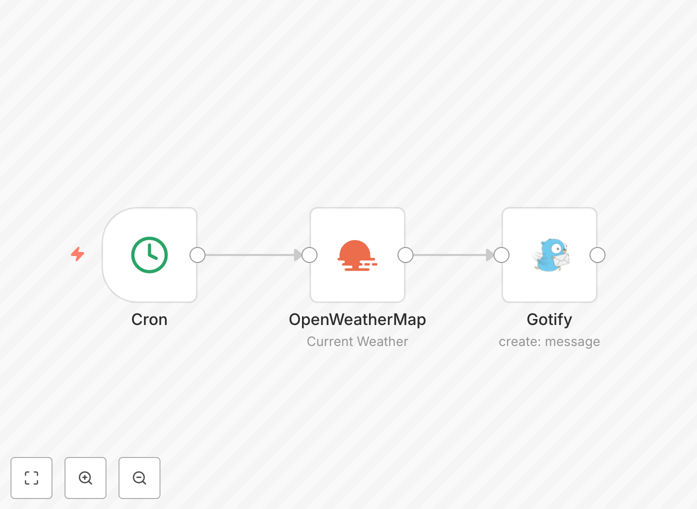
What This Workflow Does
This automation solves the problem of manually checking weather forecasts every day, which is time-consuming and easy to forget. It automatically fetches current weather conditions and forecasts from a reliable weather API at a scheduled time each day, then formats that information into a clear, concise message and sends it directly to your preferred devices via Gotify.
The workflow transforms raw weather data into actionable insights. Instead of just presenting numbers, it can highlight key information like precipitation chance, temperature highs and lows, and notable weather events, allowing you to plan your day effectively within seconds of receiving the notification.
For businesses with field teams, outdoor operations, or logistics, this automation ensures everyone starts the day with the same weather intelligence, improving safety and operational planning without requiring manual communication from managers.
How It Works
The workflow follows a logical sequence to gather, process, and deliver weather information automatically.
Step 1: Scheduled Trigger
A scheduler node (like Cron) activates the workflow at your specified time—typically early morning. This ensures the weather update arrives before you start your day, providing timely information for planning.
Step 2: Weather Data Fetching
The workflow connects to a weather API (like OpenWeatherMap) using your configured location. It retrieves current conditions and often a short-term forecast, including temperature, humidity, wind speed, precipitation probability, and weather descriptions.
Step 3: Data Processing & Formatting
Raw API data is parsed and transformed into a human-readable message. This step might convert units, apply conditional logic (e.g., "Bring an umbrella" if rain chance > 40%), and structure the information for clarity.
Step 4: Notification Delivery via Gotify
The formatted message is sent to your Gotify server using an API call. Gotify then pushes the notification to all your connected devices (phones, desktops) instantly, ensuring you receive the update wherever you are.
Who This Is For
This template is ideal for individuals who want a private, reliable daily weather briefing without relying on ad-filled weather apps. It's perfect for remote workers, travelers, outdoor enthusiasts, and anyone who values starting their day with prepared information.
Businesses with outdoor operations—construction, landscaping, event planning, logistics, and agriculture—can use this to inform field teams about conditions affecting work safety and productivity. IT administrators and developers who already use Gotify for system alerts can extend it to include environmental context for their monitoring dashboards.
What You'll Need
- A running n8n instance (cloud or self-hosted) to execute the workflow.
- API access to a weather service like OpenWeatherMap (free tier available) with an API key.
- A deployed Gotify server (self-hosted) with an application token created for sending messages.
- Gotify client apps installed on your devices (Android, iOS, desktop) to receive the notifications.
- The geographic coordinates or city name for which you want the weather forecast.
Pro tip: Use environment variables in n8n to store your API keys and Gotify tokens securely. This keeps sensitive credentials out of your workflow JSON and makes the template easier to share and reuse across different installations.
Quick Setup Guide
Follow these steps to get this automation running in your n8n environment quickly.
- Download and import the template JSON file into your n8n instance using the "Import from File" function.
- Configure the Schedule node to set your preferred daily trigger time (e.g., 7:00 AM local time).
- Set up the Weather API node by adding your service credentials (API key) and specifying your location parameters.
- Configure the Gotify node with your server URL and the application token you created in your Gotify instance.
- Test the workflow manually once to ensure data flows correctly and you receive a notification.
- Activate the workflow to let it run automatically on the schedule you set.
Key Benefits
Save 5–10 minutes daily by eliminating manual weather checks. Over a year, this reclaims 30–60 hours of time better spent on productive work or personal activities.
Ensure consistency and reliability in receiving forecast information. The automation never forgets, operates on weekends/holidays, and delivers the same structured data every time.
Maintain privacy and control by using a self-hosted notification stack (Gotify). Your weather queries and location data aren't shared with commercial messaging platforms.
Create a foundation for advanced alerts by extending this workflow. You can easily add logic for severe weather warnings, integrate with calendar events, or trigger other automations based on conditions.
Improve team coordination and safety for businesses by providing all field personnel with the same authoritative weather update at the start of each shift.