What This Workflow Does
Manual keyword research is one of the biggest time-sinks in SEO. Checking difficulty scores, analyzing SERP features, and logging data across spreadsheets can consume hours each week. This automation eliminates that grind.
The workflow connects a keyword difficulty API (via RapidAPI) with Google Sheets to create a seamless research pipeline. Submit a keyword and target country, and within seconds you get a difficulty score plus detailed SERP data—all automatically recorded in your spreadsheet for analysis, reporting, and decision-making.
This transforms SEO from a reactive, manual process into a proactive, data-driven strategy. Instead of guessing which keywords to target, you have objective metrics that help prioritize content creation and link-building efforts based on actual competition levels.
How It Works
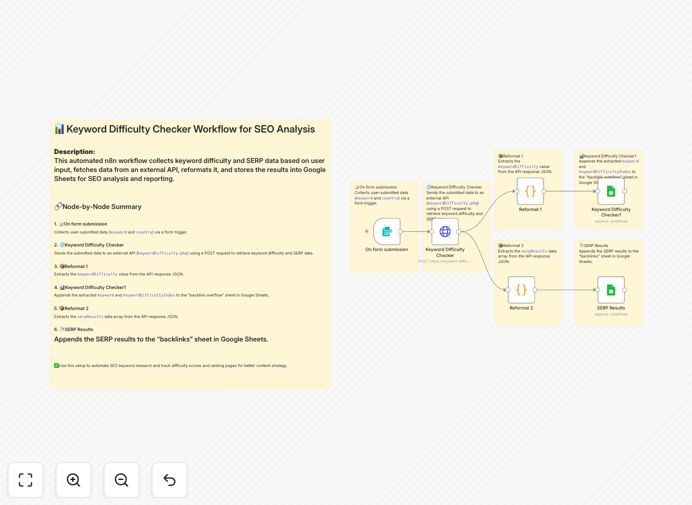
1. Form Submission Trigger
The workflow starts when a user submits a keyword and target country through a simple form interface. This could be your content team requesting research for a new blog topic, or you batch-processing a list of potential target terms.
2. API Query to RapidAPI
The submitted keyword is sent to the Keyword Difficulty Checker API on RapidAPI. This professional API analyzes search competition, domain authority of ranking pages, and other factors to generate a reliable difficulty score (typically 0-100).
3. Data Extraction & Transformation
The API response contains both the difficulty score and detailed SERP results. The workflow extracts these two data points separately—one path processes the difficulty score, another processes the SERP listings (including URLs, titles, and meta descriptions of top-ranking pages).
4. Google Sheets Integration
Extracted data flows into two separate Google Sheets tabs. The difficulty score is logged with timestamp and keyword for tracking trends over time. SERP data is stored in a structured format for competitive analysis—you can see who's ranking and what their content looks like.
Pro tip: Schedule this workflow to run weekly for your core keyword portfolio. You'll build a historical dataset that shows how competition changes over time, helping you spot emerging trends before they become mainstream.
Who This Is For
SEO agencies managing multiple clients will save countless hours on competitive analysis and reporting. Content marketers can validate topic ideas before investing in production. E-commerce businesses can identify product category opportunities with lower competition. Startups with limited resources can focus their efforts on achievable rankings rather than impossible targets.
Even freelance SEO consultants can use this to deliver more value in less time, allowing them to take on more clients or deepen their service offerings. The automation works for anyone who needs to make data-driven decisions about which keywords to target.
What You'll Need
- n8n instance (cloud or self-hosted) with workflow execution capabilities
- RapidAPI account with access to a keyword difficulty API (free tier available)
- Google Sheets document with write permissions configured
- Google Service Account credentials for API access (or OAuth setup)
- Basic understanding of SEO metrics and keyword research principles
Quick Setup Guide
1. Download the template using the button above and import it into your n8n instance.
2. Configure the RapidAPI node with your API key from the Keyword Difficulty Checker service.
3. Set up Google Sheets connections by authenticating with your Google account and specifying your target spreadsheet IDs.
4. Test with sample keywords to ensure data flows correctly from API to spreadsheet.
5. Customize the form trigger or replace it with a schedule trigger for automated batch processing.
6. Add data validation in Google Sheets to create dashboards or highlight opportunities based on your criteria.
Pro tip: Extend this workflow by adding a second API call for search volume data, then calculate a "value score" (volume ÷ difficulty) to automatically identify your highest-opportunity keywords.
Key Benefits
Save 5-10 hours weekly on manual keyword research and data entry. What used to take an afternoon now happens automatically while you focus on strategy and implementation.
Improve decision accuracy with objective difficulty scores rather than gut feelings. Data-driven targeting leads to better ROI on content production and link-building campaigns.
Scale research effortlessly from analyzing 10 keywords to 1,000 without additional time investment. Batch processing unlocks comprehensive competitive landscapes.
Create audit trails with timestamped data in Google Sheets. Track how keyword difficulty changes over time and demonstrate SEO progress to clients or stakeholders.
Reduce tool costs by leveraging affordable API services instead of expensive all-in-one SEO platforms. Pay only for the data you actually need.