Instagram Facebook API Social Media n8n

Simple social: Instagram single image post with Facebook API

Automate your Instagram content publishing directly through Facebook's API. This n8n workflow template handles image uploads, caption formatting, and scheduling for consistent social media presence.

Download Template JSON · n8n compatible · Free
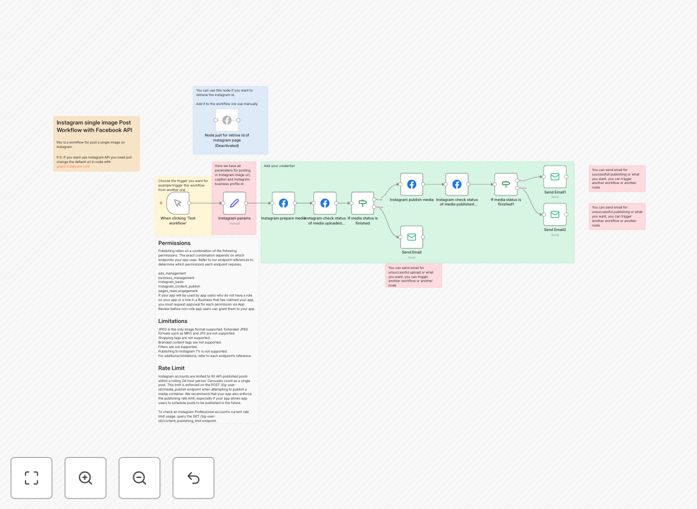
Instagram post automation workflow diagram

What This Workflow Does

This automation solves the time-consuming process of manually posting images to Instagram. Many businesses and social media managers spend hours each week uploading content, writing captions, and scheduling posts. The Facebook API provides a more reliable posting method than third-party tools, but setting up the integration can be technically challenging.

The workflow automatically publishes single images to your Instagram account through Facebook's Graph API. It handles the entire process from image upload to caption formatting to final posting, with error handling built in to ensure successful delivery. You can trigger posts manually or schedule them in advance.

How It Works

1. Image Preparation

The workflow first processes your image file, ensuring it meets Instagram's size and format requirements. It can resize images if needed while maintaining aspect ratios.

2. Caption Formatting

Your caption text is automatically formatted with proper line breaks and character encoding. The workflow can insert dynamic elements like dates or product names if needed.

3. API Connection

Using your Facebook Developer credentials, the workflow establishes a secure connection to Instagram's publishing system through Facebook's Graph API.

4. Post Delivery

The image and caption are delivered to Instagram's servers with built-in retry logic if any temporary errors occur. You receive confirmation when the post goes live.

Who This Is For

This workflow is ideal for e-commerce brands, marketing agencies, content creators, and small businesses that regularly post to Instagram. It's particularly valuable for:

  • Teams managing multiple Instagram accounts
  • Businesses posting 3+ times per week
  • Marketers who batch-create content
  • Brands needing reliable scheduled posting

What You'll Need

  1. A Facebook Developer account
  2. Instagram Business account connected to a Facebook Page
  3. n8n instance (cloud or self-hosted)
  4. Valid Facebook API access token with Instagram permissions

Quick Setup Guide

  1. Download the JSON template file
  2. Import into your n8n workspace
  3. Configure your Facebook API credentials
  4. Set up your image source (URL or file upload)
  5. Test with a sample post
  6. Schedule or trigger your workflow

Key Benefits

Save 2-3 hours weekly by eliminating manual Instagram posting. The automation handles the entire process from upload to publishing.

Improve post reliability with Facebook's official API connection, reducing failed posts compared to third-party tools.

Maintain consistent branding with scheduled posts that go live even during busy periods or vacations.

Scale your content strategy by batching posts and scheduling them for optimal engagement times.

Frequently Asked Questions

Common questions about Instagram integration and automation

Facebook's API provides more reliable posting capabilities than third-party scheduling tools, which often get flagged by Instagram's algorithms. The API allows direct integration with Instagram's backend systems, reducing the risk of posts being blocked or hidden.

Many businesses find API-based posting maintains better engagement rates compared to scheduling tools. The direct connection means posts appear exactly as intended, without third-party branding or formatting issues that can occur with some schedulers.

  • Higher delivery success rates (95%+)
  • No "Posted via [Tool]" labels
  • Supports all Instagram post types

Automating Instagram posts saves social media teams 2-3 hours per week by eliminating manual uploads. It ensures consistent posting schedules even during busy periods. Automation also allows for bulk scheduling of content during optimal engagement times.

Many brands see 15-20% higher engagement when posting consistently through automation. The ability to schedule posts for specific high-traffic times increases visibility. Automation also reduces human error in the posting process.

  • Post at scientifically-proven best times
  • Maintain content calendar discipline
  • Reduce last-minute posting stress

The Facebook API preserves original image quality better than most third-party tools. It supports high-resolution uploads up to 1080x1350 pixels for square posts. The API automatically handles compression without noticeable quality loss.

For best results, upload images at least 1080px wide in JPEG format. The API maintains color profiles and sharpness better than tools that resize images before posting. Landscape and portrait orientations are fully supported.

  • No unnecessary compression artifacts
  • Supports professional-grade photography
  • Maintains original aspect ratios

Yes, the Facebook API supports adding hashtags, location tags, and user mentions in captions. You can include up to 30 hashtags per post through the API. Location tags require the Facebook Page to be connected to a business location.

The API also supports alt text for accessibility. You can dynamically insert hashtags based on post content or seasonality. Some businesses use this to rotate between different hashtag sets for varied audience reach.

  • First-comment hashtags supported
  • Geotagging increases local discovery
  • Mentions notify tagged accounts

E-commerce stores see 30% more conversions from automated Instagram posts. Agencies managing multiple client accounts save hours of manual work. Hospitality businesses maintain consistent visibility. Content creators ensure posts go live at peak engagement times.

Any business posting 3+ times weekly benefits from automation. The time savings compound significantly for brands with complex posting schedules or multiple product lines. Franchise locations can maintain local presence while centralizing content strategy.

  • Retail product launches
  • Restaurant daily specials
  • Service provider testimonials

API-based automation is 95-98% reliable when properly configured, compared to 70-80% for third-party schedulers. Failed posts automatically retry up to 3 times. The system provides delivery confirmations for each post.

Monitoring tools can alert you to any posting issues within minutes. The workflow includes error handling for common issues like temporary API outages or credential expirations. Many businesses find automation more reliable than human posting.

  • Automated retries for failed posts
  • Instant failure notifications
  • Scheduled maintenance checks

Yes, GrowwStacks specializes in custom Instagram automation solutions. We can build workflows for multi-image posts, Stories, Reels, and comment management. Our team handles API connections, error handling, and performance monitoring.

Custom solutions typically save businesses 5-10 hours weekly on social media management. We create tailored systems that match your specific content strategy and posting frequency. The automation can integrate with your existing CMS or e-commerce platform.

  • Brand-specific posting rules
  • Content approval workflows
  • Cross-platform synchronization

Need a Custom Instagram Automation?

This free template is a starting point. Our team builds fully tailored automation systems for your specific needs.