n8n JSReport Document Automation Accounting HR

Streamlining document automation with n8n and JSReport

Automate invoice generation, contracts, and reports between n8n and JSReport with this workflow template

Download Template JSON · n8n compatible · Free
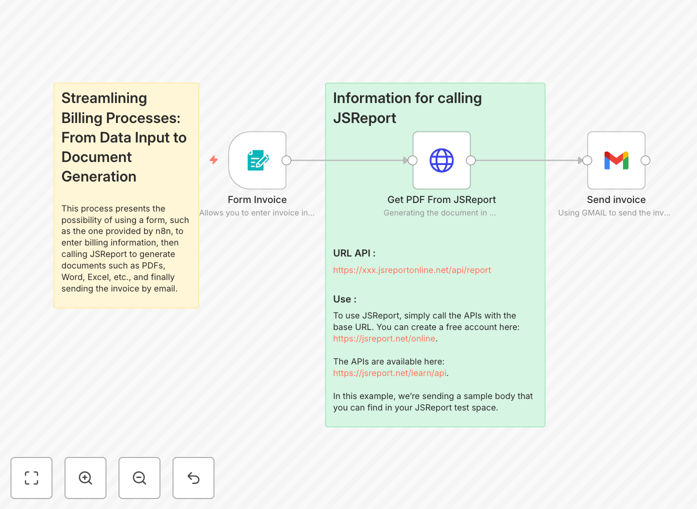
Document automation workflow between n8n and JSReport

What This Workflow Does

This workflow template solves the time-consuming manual process of generating business documents like invoices, contracts, and reports. By connecting n8n with JSReport, it automates document creation triggered by events in your existing systems.

When new data enters your workflow (like a completed project, new hire, or invoice request), the template automatically formats this information into professional documents using JSReport's templating system, then delivers them to the right recipients.
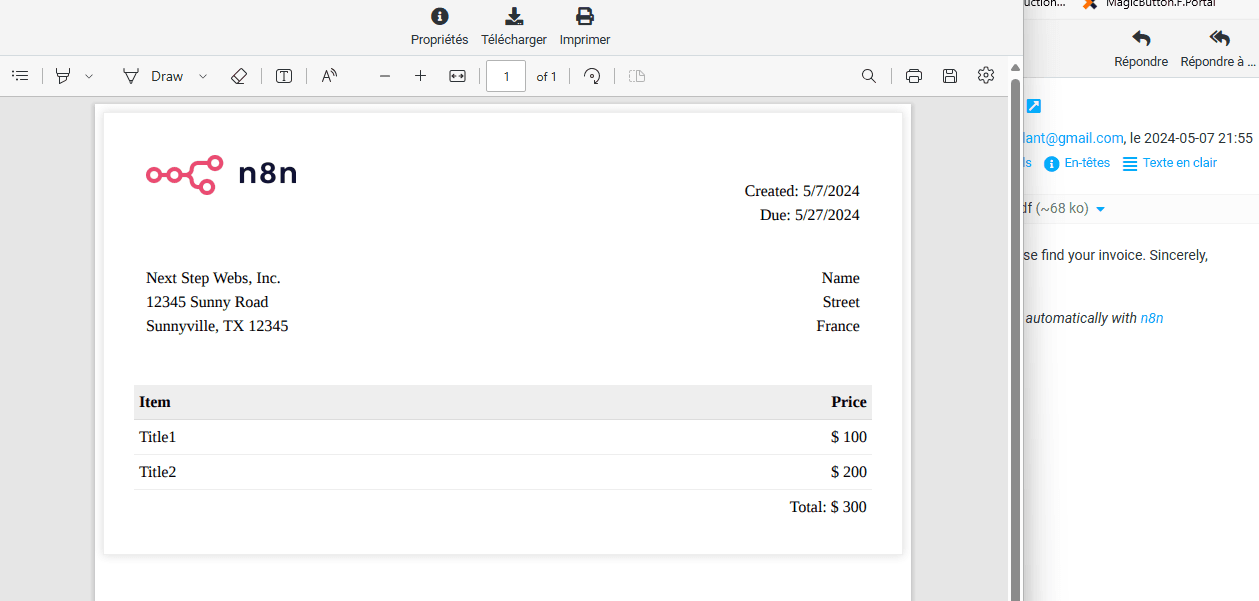
Example automated invoice generated by the workflow
Professional invoice automatically generated from workflow data

How It Works

1. Trigger Event Detection

The workflow monitors your connected systems for trigger events like new form submissions, database entries, or API calls that indicate a document needs to be generated.

2. Data Collection and Formatting

Relevant data is collected from multiple sources and formatted into a standardized structure that JSReport can process.

3. Document Generation

The formatted data is sent to JSReport where it's merged with your predefined templates to create PDFs, Word documents, or other formats.

4. Delivery and Storage

Completed documents are automatically emailed to recipients, uploaded to cloud storage, or sent to other systems as needed.

Pro tip: Create multiple template variations in JSReport for different document types (invoices, contracts, reports) and have the workflow select the appropriate template based on the trigger event.

Who This Is For

This automation is ideal for:

  • Accounting teams automating invoice generation
  • HR departments creating employment contracts
  • IT project managers generating client reports
  • Operations teams producing standardized documentation

What You'll Need

  1. An active n8n instance (self-hosted or cloud)
  2. JSReport account with templates configured
  3. Data source(s) that trigger document creation
  4. Destination systems for completed documents (email, cloud storage, etc.)

Quick Setup Guide

  1. Import the JSON template into your n8n instance
  2. Configure your trigger node (webhook, database, etc.)
  3. Connect your JSReport account and select templates
  4. Set up document delivery methods (email, cloud storage, etc.)
  5. Test with sample data and deploy

Key Benefits

Reduce document processing time by 80%: What used to take hours of manual work now happens automatically in minutes.

Eliminate human errors: Automated data transfer ensures perfect accuracy in every generated document.

Standardize document formatting: Every output follows your corporate branding guidelines consistently.

Scale document production effortlessly: Handle spikes in volume without adding staff.

Improve audit trails: Every document generation is logged with complete data history.

Frequently Asked Questions

Common questions about document automation between n8n and JSReport

This integration can automate virtually any document type including invoices, contracts, reports, certificates, and statements. JSReport supports PDF, Word, Excel, and HTML outputs with professional formatting.

Common use cases include automatically generating invoices from accounting data, creating employment contracts from HR systems, and producing client reports from project management tools. The flexibility allows businesses to automate their most repetitive document workflows.

  • Supports dynamic tables, charts, and conditional formatting
  • Maintains corporate branding across all documents
  • Handles complex multi-page document structures

Document automation eliminates manual data entry and formatting, which are among the most time-consuming office tasks. By connecting systems directly to document generation, businesses reduce processing time from hours to minutes.

A law firm using this automation reduced contract preparation time by 85% while eliminating errors in client details. Their staff now focuses on higher-value legal work rather than document formatting. Similar benefits apply to accounting, HR, and operations teams across industries.

  • Reduces document processing costs by 60-90%
  • Eliminates version control issues
  • Ensures compliance with standardized templates

Yes, JSReport can import existing Word documents and PDF templates, then enhance them with dynamic fields. This allows businesses to maintain their current branding while adding automation capabilities.

The system preserves all formatting, logos, and design elements while replacing static text with dynamic data fields. Migration typically takes just minutes per template, making it easy to transition from manual to automated document workflows without redesigning templates.

  • Supports DOCX, PPTX, and XLSX file formats
  • Maintains complex formatting like tables and styles
  • Allows gradual template migration

Both n8n and JSReport offer enterprise-grade security with options for self-hosting, data encryption, and access controls. Document automation can actually improve security by reducing manual handling of sensitive data.

Financial institutions using this workflow have implemented additional safeguards like watermarking, digital signatures, and automated redaction of sensitive fields. The system generates detailed audit logs showing exactly who accessed each document and when.

  • Supports SOC 2 and GDPR compliance
  • Optional on-premises deployment available
  • Role-based access control for templates

n8n supports hundreds of potential triggers including databases, APIs, webhooks, email, and file uploads. Common triggers include new records in accounting software, form submissions, or scheduled report generation.

A healthcare provider automated patient statements by triggering document generation from their EHR system. The workflow pulls patient data, generates the statement, and emails it without staff intervention. Similar integrations work with CRM, ERP, and custom business systems.

  • Works with SQL and NoSQL databases
  • Supports REST and GraphQL APIs
  • Can process CSV and Excel file uploads

The workflow can select different JSReport templates based on data conditions. For example, an invoice workflow might use different templates for domestic vs international clients, or include special terms for overdue accounts.

An e-commerce business uses conditional documents to generate packing slips with localized return instructions based on the shipping destination. The system automatically selects the appropriate language template and includes relevant legal requirements for each country.

  • Supports if/then/else template selection
  • Can hide/show document sections conditionally
  • Allows dynamic content based on data values

Absolutely! GrowwStacks specializes in building custom document automation solutions tailored to your specific business processes. While this free template provides a starting point, we can design a complete system integrated with your existing software.

Our team has built custom document workflows for legal firms generating court filings, manufacturers creating shipping documents, and schools producing student reports. We handle everything from template design to system integration and staff training.

  • Free consultation to assess your needs
  • End-to-end implementation support
  • Ongoing maintenance and optimization

Need a Custom Document Automation Solution?

This free template is a starting point. Our team builds fully tailored automation systems for your specific needs.