What This Workflow Does
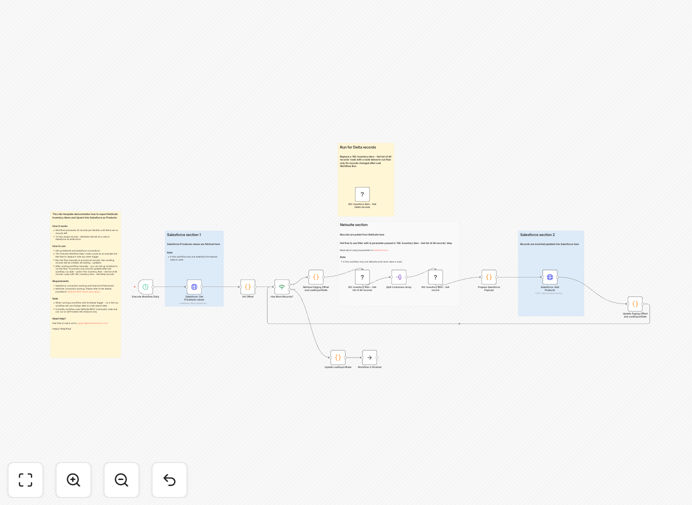
This automation solves the critical challenge of keeping product inventory data synchronized between NetSuite (your ERP system) and Salesforce (your CRM). When inventory levels, product details, or pricing changes in NetSuite, this workflow automatically updates the corresponding records in Salesforce Products.
The solution eliminates manual data entry errors, ensures sales teams always have accurate product availability information, and maintains consistency across both systems. It handles both new product creation in Salesforce when items are added to NetSuite, as well as updates to existing product records.
How It Works
1. NetSuite Inventory Trigger
The workflow monitors your NetSuite inventory items for changes, either on a scheduled basis or triggered by specific events like stock level adjustments or new product additions.
2. Data Transformation
The system maps NetSuite inventory fields to their corresponding Salesforce Product fields, handling any necessary format conversions (like currency, units of measure, or categorization).
3. Salesforce Product Sync
For each inventory item, the workflow checks if a matching Product exists in Salesforce (typically by SKU or product code). If found, it updates the record; if not, it creates a new Product with all relevant details.
4. Error Handling & Logging
The system includes robust error handling to manage connection issues, validation errors, or mapping problems, with detailed logging for troubleshooting.
Who This Is For
This workflow is ideal for businesses that use NetSuite for inventory/ERP management and Salesforce for CRM/sales operations. It's particularly valuable for:
- Ecommerce companies with complex product catalogs
- Manufacturers with frequently changing inventory levels
- Distributors managing large product SKU counts
- Businesses experiencing sales delays due to inventory data mismatches
What You'll Need
- Active NetSuite account with API access
- Salesforce account with Products object enabled
- n8n instance (cloud or self-hosted)
- Admin access to configure API connections
- Field mapping document between NetSuite and Salesforce product fields
Quick Setup Guide
- Download the JSON template file
- Import into your n8n instance
- Configure NetSuite and Salesforce API connections
- Map your specific NetSuite fields to Salesforce Product fields
- Test with a small subset of products
- Schedule the workflow to run at your preferred frequency
Key Benefits
Eliminate manual data entry: Save 5-15 hours per week previously spent copying product data between systems.
Improve sales accuracy: Ensure your sales team always sees current inventory levels and product details in Salesforce.
Reduce fulfillment errors: Prevent overselling by keeping stock levels synchronized in real-time.
Maintain data consistency: Automatic syncing means product descriptions, pricing, and attributes stay identical across both platforms.
Scalable solution: Handles thousands of SKUs without additional manual effort as your product catalog grows.
Pro tip: For best results, run the sync during off-peak hours and consider adding a validation step to flag significant inventory discrepancies between systems.