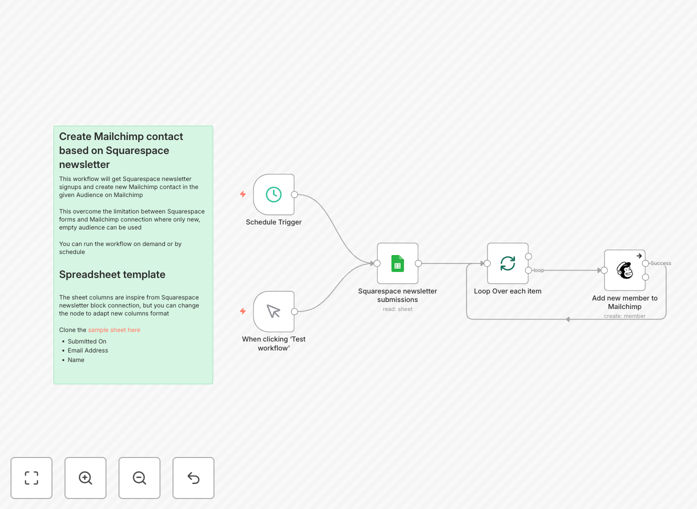
What This Workflow Does
If you run a Squarespace website, you've likely encountered a frustrating limitation: the native Mailchimp integration only works with new, empty audiences. This means you can't add subscribers to your existing, carefully segmented email lists. Every new signup requires manual copying and pasting, leading to missed leads and hours of administrative work.
This automation solves that problem completely. It captures newsletter signups from your Squarespace forms, stores them in a Google Sheet for review and backup, and then automatically adds them as contacts to your chosen Mailchimp audience. The workflow runs on a schedule you set, ensuring your email list stays current without any manual intervention.
Beyond just syncing emails, this system creates a reliable bridge between your website and your marketing platform. It handles data validation, prevents duplicates, and gives you complete control over which audience receives new subscribers—something Squarespace's built-in tools simply cannot do.
How It Works
The workflow follows a clear, three-step process that ensures data integrity and reliability at each stage.
1. Data Capture from Google Sheets
Squarespace automatically sends form submissions to a connected Google Sheet. The workflow reads new rows from this sheet, capturing the subscriber's email, name, submission timestamp, and any additional form fields you've configured.
2. Data Processing and Validation
Before sending data to Mailchimp, the workflow checks for duplicate email addresses, validates email formats, and can apply custom business rules. This processing step ensures only clean, valid data enters your email list, protecting your sender reputation.
3. Mailchimp Integration
The validated subscriber data is then added to your specified Mailchimp audience. The workflow maps Squarespace form fields to corresponding Mailchimp merge fields, allowing you to capture and use subscriber information for personalization in your email campaigns.
Pro tip: Use this workflow to add subscribers to multiple Mailchimp audiences based on which Squarespace form they submitted from. For example, blog signups could go to a "General Newsletter" list while webinar registrations go to a "Product Updates" list.
Who This Is For
This automation is ideal for Squarespace website owners, marketers, and small business operators who value their email list but don't have technical resources to build custom integrations. Specifically, it's perfect for:
Content creators and bloggers who want to grow their newsletter audience directly from their Squarespace site without manual work. Small business owners using Squarespace for their online presence who need reliable lead capture for their email marketing. Marketing agencies managing multiple client websites who need a standardized, reliable way to connect Squarespace forms to various email platforms. Coaches and consultants who offer lead magnets or free resources through Squarespace forms and want to automate their follow-up sequence.
What You'll Need
- A Squarespace website with a form or newsletter block configured to send submissions to Google Sheets.
- A Google account with access to Google Sheets and the Google Sheets API enabled.
- A Mailchimp account with an existing audience/list where you want to add subscribers.
- Mailchimp API credentials (an API key) to allow the workflow to connect to your account.
- n8n instance (cloud or self-hosted) where you can import and run the workflow.
Quick Setup Guide
Getting this automation running takes about 15 minutes if you have your credentials ready.
- Download and import the template JSON file into your n8n instance.
- Connect Google Sheets by adding your credentials and specifying the spreadsheet ID and worksheet name where Squarespace sends submissions.
- Connect Mailchimp using your API key and select the target audience ID where new subscribers should be added.
- Configure the schedule trigger to run at your preferred interval (hourly is recommended for timely syncing).
- Test the workflow by submitting a test form on your Squarespace site and verifying the subscriber appears in your Mailchimp audience.
Pro tip: Before going live, run the workflow manually a few times with test data to ensure field mapping is correct. Pay special attention to how names and custom fields transfer from Squarespace to Mailchimp merge fields.
Key Benefits
Eliminate manual data entry completely. What used to take 10-15 minutes daily of copying emails from Google Sheets to Mailchimp now happens automatically, saving 5+ hours per month for even modest list growth.
Capture 100% of your leads. Manual processes inevitably miss submissions during busy periods or vacations. This automation ensures every signup is captured and added to your list within your chosen timeframe.
Maintain data quality and list hygiene. The workflow includes validation steps that check for duplicate emails and proper formatting before adding contacts to Mailchimp, protecting your sender reputation and improving deliverability.
Gain flexibility Squarespace lacks. Unlike the native integration, this solution lets you add subscribers to existing audiences, use custom field mapping, and apply business logic before syncing.
Create a reliable backup system. All submissions remain in Google Sheets even after being added to Mailchimp, giving you an audit trail and backup of your lead data independent of either platform.