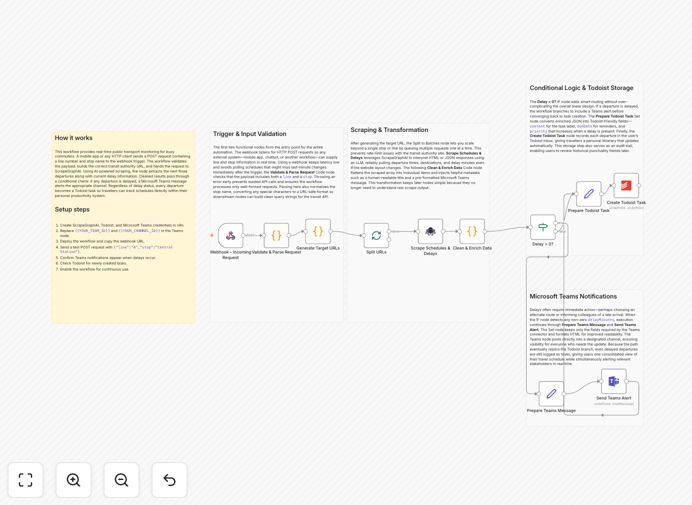
What This Workflow Does
This automation solution solves the critical business problem of transport delays disrupting operations. By automatically monitoring public transport schedules through web scraping, it provides real-time alerts when delays occur, helping teams proactively manage disruptions.
The workflow integrates ScrapeGraphAI to extract schedule data from transport websites, analyzes the information for delays, then simultaneously notifies your entire team via Microsoft Teams while creating actionable follow-up tasks in Todoist. This eliminates manual monitoring while ensuring consistent communication and task delegation during transport disruptions.
How It Works
1. Schedule Monitoring
The workflow uses ScrapeGraphAI to periodically scrape transport websites for schedule updates. It compares current departure/arrival times against expected schedules to detect delays.
2. Delay Analysis
When discrepancies are found, the system evaluates whether the difference exceeds your configured threshold (e.g., 5+ minute delay) before triggering alerts, preventing notifications for minor schedule variations.
3. Team Notification
Confirmed delays generate instant alerts in your Microsoft Teams channel, including details about affected routes, expected delay duration, and potential impact on operations.
4. Task Creation
Simultaneously, the system creates prioritized tasks in Todoist for relevant team members, such as rescheduling client meetings or adjusting delivery timelines based on the delay impact.
Who This Is For
This workflow benefits any business where employee punctuality impacts operations. Field service companies can reschedule appointments, delivery services can adjust routes, and office-based teams can rearrange meetings when staff are delayed.
Educational institutions managing faculty schedules, healthcare providers coordinating home visits, and sales teams traveling between client sites will particularly benefit from automated delay tracking and response.
What You'll Need
- An n8n instance (cloud or self-hosted)
- Microsoft Teams with webhook access
- Todoist account with API access
- ScrapeGraphAI configured for your target transport sites
- List of critical transport routes to monitor
Quick Setup Guide
- Import the JSON template into your n8n instance
- Configure ScrapeGraphAI with your target transport websites
- Set up your Microsoft Teams webhook connection
- Connect your Todoist account and configure task templates
- Adjust delay thresholds based on your operational needs
- Test with known delayed routes to verify notifications
Key Benefits
Reduce operational disruptions: Get advance warning of transport delays to adjust schedules before employees arrive late.
Improve team communication: Ensure everyone receives consistent, simultaneous notifications about delays affecting their work.
Automate contingency planning: Automatically create follow-up tasks so the right people take action without manual delegation.
Save administrative time: Eliminate hours spent manually checking transport status websites and notifying affected teams.
Enhance client service: Proactively inform clients about potential delays caused by transport issues.
Pro tip: For maximum effectiveness, customize the Todoist tasks to include specific actions your team should take for different delay durations (e.g., 15-minute vs. 60-minute delays).