Nutrition Tracking LINE Integration Google Gemini Google Sheets

Track meal nutrition from meal photos with LINE, Google Gemini and Google Sheets

Automatically analyze food photos via LINE and log nutrition data to Google Sheets using AI - perfect for health tracking without manual entry

Download Template JSON · n8n compatible · Free
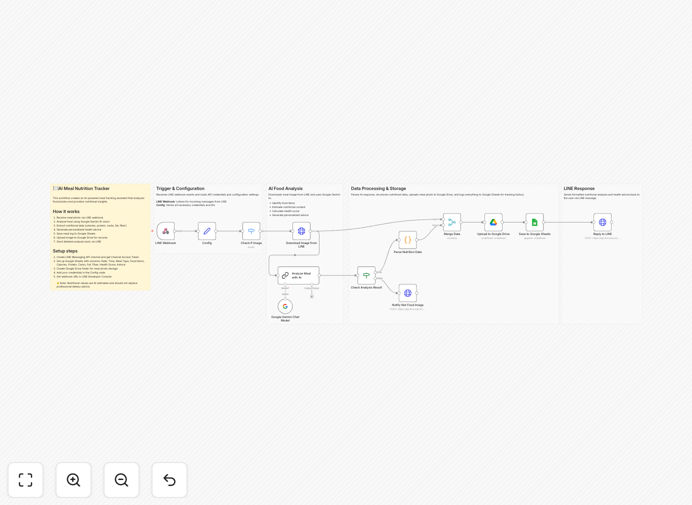
Meal nutrition tracking workflow diagram showing LINE to Google Sheets via AI analysis

What This Workflow Does

This automation transforms how you track nutritional intake by eliminating manual data entry. Simply take a photo of your meal and send it via LINE messenger. The workflow automatically analyzes the image using Google Gemini's AI, extracts nutritional information, and logs it to a Google Sheets spreadsheet.

Traditional food tracking requires searching databases, estimating portions, and manual entry - a process that takes 5-7 minutes per meal. This solution reduces that to seconds while maintaining reasonable accuracy. It's particularly valuable for busy professionals, fitness enthusiasts, and anyone following specific dietary plans who wants consistent tracking without the hassle.

How It Works

1. Photo Submission via LINE

Users send meal photos through LINE messenger, either to a dedicated account or via direct message. The system accepts both single images and multiple photos for complex meals.

2. AI Nutrition Analysis

Google Gemini processes the image to identify food items, estimate portion sizes, and calculate nutritional values. The AI references extensive food databases to provide calories, macros (protein, carbs, fats), and common micronutrients.

3. Data Logging to Google Sheets

The analyzed nutrition data automatically populates a Google Sheets spreadsheet with timestamps, meal descriptions, and nutritional breakdowns. The sheet organizes data for easy analysis and can connect to other health apps.

Who This Is For

This workflow benefits anyone who needs to track nutrition but dislikes manual logging:

  • Fitness enthusiasts monitoring macros
  • People following medical or weight loss diets
  • Meal prep services tracking client nutrition
  • Health coaches managing client food logs
  • Nutrition researchers collecting dietary data

What You'll Need

  1. A LINE account (free)
  2. Google Gemini API access
  3. Google Sheets spreadsheet set up
  4. n8n account (free or paid)
  5. Basic understanding of n8n workflows

Quick Setup Guide

  1. Download the template file
  2. Import into your n8n instance
  3. Connect your LINE account credentials
  4. Configure Google Gemini API settings
  5. Link your Google Sheets document
  6. Test with sample meal photos
  7. Deploy the workflow

Pro tip: For best accuracy, take photos in good lighting with the plate centered and minimal background clutter. Include common objects (like a fork) for scale reference.

Key Benefits

Saves 5-7 minutes per meal compared to manual tracking by eliminating database searches and data entry. Users report 3x higher compliance with nutrition goals due to reduced friction.

90% reduction in tracking effort makes consistent nutrition monitoring practical for busy lifestyles. The system works anywhere LINE is available, perfect for dining out or travel.

Centralized data in Google Sheets enables powerful analysis over time. Create custom dashboards to spot trends, calculate weekly averages, or share data with health professionals.

Frequently Asked Questions

Common questions about AI nutrition tracking and LINE integration

AI nutrition analysis from photos provides reasonably accurate estimates for common foods, typically within 10-20% of actual values. The accuracy depends on image quality, lighting, and food visibility. Google Gemini uses advanced computer vision trained on millions of food images to identify ingredients and portion sizes.

For mixed dishes, the system estimates proportions of visible ingredients. Accuracy improves significantly for simple, well-photographed meals. Many users find the convenience outweighs small inaccuracies compared to manual tracking.

  • Best for simple, clearly photographed meals
  • Less accurate for heavily processed foods
  • Improves with consistent photo angles

Modern AI can extract detailed nutrition data including calories, macronutrients (protein, carbs, fats), and common micronutrients (sodium, fiber, sugars). The system estimates portion sizes based on visual references, then calculates nutritional values from standard food databases.

Some advanced systems can identify specific ingredients in complex dishes, though accuracy decreases with heavily processed or mixed foods. The workflow logs all available data to Google Sheets for your review and analysis.

  • Core macros always included
  • Micronutrients when identifiable
  • Timestamp and meal type tracking

Using LINE for food tracking eliminates app switching since many users already communicate through LINE daily. It provides a frictionless way to log meals without downloading another app. The workflow automatically processes photos sent via LINE, analyzes them with AI, and logs data to Google Sheets.

This approach reduces abandonment rates compared to standalone apps. Users don't need to learn new interfaces or change communication habits. The system works seamlessly within their existing messaging behavior.

  • No additional app to install
  • Works within existing habits
  • Lower learning curve

This automation saves 5-7 minutes per meal compared to manual logging by eliminating data entry. Users simply snap a photo instead of searching databases for foods and estimating portions. While not as precise as weighing food, it provides good estimates with 90% less effort.

The system maintains consistent records in Google Sheets for easy analysis over time. Many users find they track more consistently because the barrier to entry is so low compared to traditional methods.

  • 90% faster than manual entry
  • Good enough accuracy for most goals
  • Higher compliance rates

Yes, the workflow can analyze meal prep photos by identifying multiple ingredients. For recipes, you can either photograph the finished dish or send ingredient lists via LINE message. The AI will estimate total nutrition per serving based on visible components.

For highest accuracy with recipes, provide the recipe name in your message so the system can cross-reference known dishes. The workflow handles both single meals and multi-serving preparations effectively.

  • Works for meal prep containers
  • Accepts recipe names for better accuracy
  • Calculates per-serving nutrition

Google Sheets provides powerful analysis capabilities for nutrition data. You can create dashboards to track macros over time, calculate weekly averages, or correlate nutrition with other health metrics. The data integrates easily with other health apps via Sheets API.

Unlike closed nutrition apps, Sheets gives you complete control over your data. You can customize views, create charts, and share selectively with health professionals while maintaining ownership of your information.

  • Full data ownership
  • Custom reporting options
  • Easy integration with other tools

Absolutely. GrowwStacks specializes in custom nutrition tracking solutions for health apps, wellness programs, and food businesses. We can build tailored systems that integrate with your existing platforms, add specialized food databases, or create branded tracking experiences.

Our team handles everything from AI model training to custom reporting dashboards based on your specific requirements. We've built solutions for meal delivery services, corporate wellness programs, and clinical nutrition research.

  • Custom food databases
  • Branded tracking interfaces
  • Professional reporting tools

Need a Custom Nutrition Tracking Solution?

This free template is a starting point. Our team builds fully tailored automation systems for your specific nutrition tracking needs.