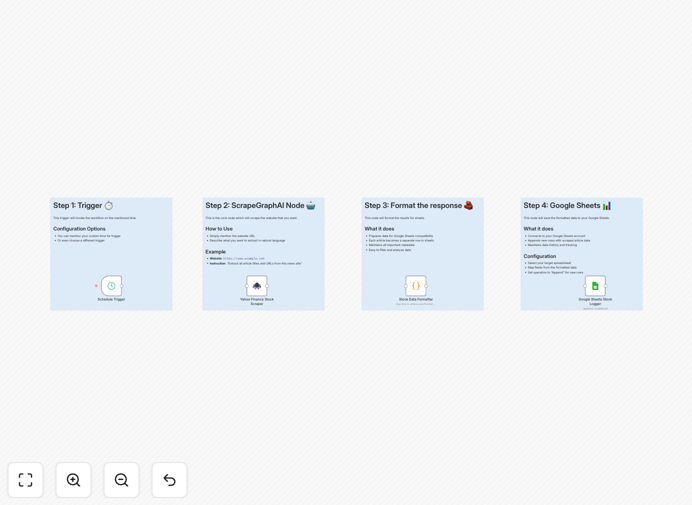
What This Workflow Does
This AI-powered automation solves the tedious manual process of tracking stock prices across multiple companies. Instead of checking Yahoo Finance or other sources daily, this workflow automatically scrapes current stock data using ScrapeGraphAI, processes the information, and updates a Google Sheets spreadsheet with the latest prices.
The solution eliminates hours of manual data entry while ensuring your investment tracking remains current. It's particularly valuable for investors, financial advisors, and business analysts who need to monitor multiple stocks regularly.
How It Works
1. ScrapeGraphAI extracts stock data
The workflow begins by using ScrapeGraphAI to intelligently scrape current stock prices from Yahoo Finance. The AI component ensures reliable data extraction even if the website structure changes slightly.
2. Data processing and validation
The scraped data is then processed to extract only the relevant stock information (price, change percentage, volume etc.). The workflow includes error handling to ensure data quality.
3. Google Sheets update
The processed stock data is automatically written to your designated Google Sheet, either appending new records or updating existing ones based on your configuration.
Pro tip: Schedule this workflow to run at market close each day to maintain an accurate historical record of stock performance.
Who This Is For
This automation is ideal for individual investors tracking their portfolio, financial advisors managing client investments, and business analysts monitoring industry competitors. It's particularly valuable for:
- Day traders needing real-time price updates
- Investment clubs tracking group decisions
- Financial educators demonstrating market trends
- Startups monitoring competitor valuations
What You'll Need
- An n8n instance (cloud or self-hosted)
- Google Sheets with write permissions
- Yahoo Finance accounts for the stocks you want to track
- ScrapeGraphAI API access (free tier available)
Quick Setup Guide
- Download and import the JSON template into your n8n instance
- Configure the ScrapeGraphAI node with your target stocks
- Connect the Google Sheets node to your spreadsheet
- Set your preferred schedule (daily, hourly, etc.)
- Test the workflow with a few sample stocks
- Activate the workflow for automatic updates
Key Benefits
Save 5+ hours weekly by eliminating manual stock price tracking and data entry into spreadsheets.
Reduce human error with automated data collection that's more accurate than manual entry.
Create historical records automatically by timestamping each price update in your spreadsheet.
Get alerted to significant changes by extending the workflow with notification triggers.
Scale effortlessly from tracking 5 stocks to 500 without additional time investment.