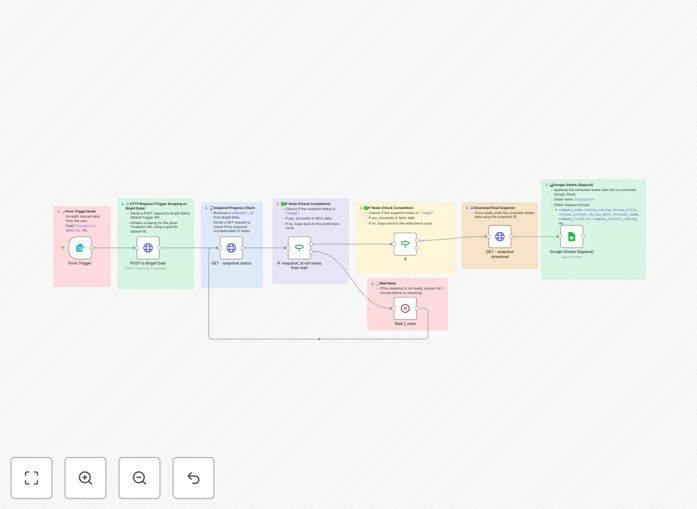
What This Workflow Does
Manual review monitoring is time-consuming and inconsistent. This automation solves that by automatically scraping Trustpilot business pages, extracting detailed review data, and organizing it in Google Sheets for analysis. It captures 35+ data points including ratings, reviewer information, dates, and company details—transforming unstructured review content into structured business intelligence.
The workflow initiates scraping via Bright Data's reliable infrastructure, monitors job completion, downloads the structured dataset, and appends it to your specified Google Sheet. This creates a living database of customer sentiment that updates automatically, eliminating hours of manual data collection each week.
Whether you're tracking your own brand reputation, monitoring competitors, or conducting market research, this automation provides consistent, accurate data without manual intervention. The structured output enables trend analysis, sentiment tracking, and data-driven decision making.
How It Works
The workflow follows a logical sequence to ensure reliable data collection and storage:
1. URL Input & Trigger
You provide the Trustpilot business URL through a simple form interface. The workflow accepts this input and prepares it for processing, validating the URL format before proceeding to the scraping stage.
2. Bright Data API Integration
The workflow sends the URL to Bright Data's scraping infrastructure via API. Bright Data handles the complex scraping logic, including JavaScript rendering, anti-bot bypass, and data extraction from Trustpilot's dynamic pages.
3. Status Monitoring Loop
After initiating the scrape, the workflow enters a monitoring loop that checks job status every minute. This ensures the process waits for completion without timing out or making excessive API calls, managing rate limits intelligently.
4. Data Retrieval & Processing
Once the scrape completes, the workflow downloads the structured JSON data containing all extracted review information. It processes this data, mapping 35+ fields including ratings, dates, reviewer details, and business information.
5. Google Sheets Integration
The processed data is automatically appended to your specified Google Sheet. Each review becomes a new row with columns for every data point, creating a clean, analyzable dataset ready for reporting and visualization.
Who This Is For
This automation is ideal for marketing agencies conducting competitive analysis, brand managers monitoring online reputation, market researchers gathering consumer insights, and SaaS companies tracking customer sentiment. It's particularly valuable for businesses in competitive sectors where customer reviews directly impact purchasing decisions.
Product managers can use it to identify feature requests and pain points. Customer success teams can track satisfaction trends. Executives gain visibility into brand perception without manual data gathering. The workflow scales from monitoring a single brand to tracking dozens of competitors simultaneously.
What You'll Need
- n8n instance (cloud or self-hosted) with workflow execution capabilities
- Bright Data account with API access and configured dataset for Trustpilot scraping
- Google account with Sheets API enabled and a destination spreadsheet prepared
- Trustpilot business URLs you want to monitor (your company or competitors)
- Basic understanding of API credentials and spreadsheet management
Pro tip: Create a dedicated Google Sheet with pre-formatted columns matching the 35+ data fields before running the workflow. This ensures clean data organization from the start.
Quick Setup Guide
Follow these steps to implement this automation in under 15 minutes:
- Download the template using the button above and import it into your n8n instance
- Configure Bright Data credentials in the HTTP Request nodes with your API key
- Set up Google Sheets OAuth connection and update the spreadsheet ID in the Google Sheets node
- Test with a single Trustpilot URL to verify the scraping and data mapping works correctly
- Schedule the workflow to run daily or weekly for continuous monitoring
- Create data visualizations in Google Sheets or connect to BI tools for analysis
Key Benefits
Save 10+ hours monthly on manual review collection and data entry. What used to be a tedious weekly task now happens automatically with perfect consistency.
Gain competitive intelligence by tracking multiple competitors simultaneously. Identify their strengths and weaknesses through customer feedback patterns.
Improve response times to negative reviews with immediate notifications. The faster you address concerns, the better your reputation recovery.
Enable data-driven decisions with historical trend analysis. Track rating changes over time and correlate them with business initiatives.
Scale effortlessly from one brand to dozens without additional work. The same automation handles any number of Trustpilot URLs.