What This Workflow Does
This automation transforms YouTube video monitoring into an intelligent content analysis pipeline. When new videos matching your criteria are published, the system automatically generates AI-powered summaries using GPT-4o, routes them through Slack for team approval, posts the finalized versions to Discord channels, and logs all activity in Google Sheets.
Content teams save 5-7 hours per week by eliminating manual video review while gaining consistent, searchable records of industry insights. The approval workflow ensures quality control, while the Sheets integration provides long-term trend analysis capabilities.
How It Works
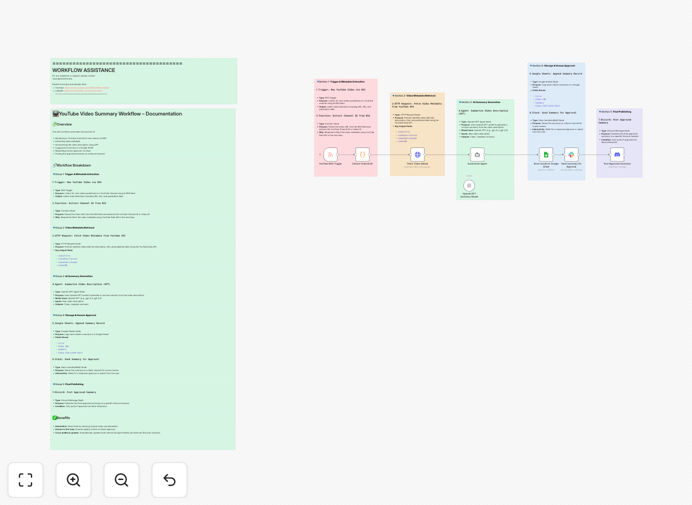
1. YouTube Video Trigger
The workflow monitors specified YouTube channels or searches for keywords, triggering when new matching videos are published. It captures the video URL, title, description, and transcript automatically.
2. GPT-4o Analysis
The system sends the video transcript to GPT-4o with customized prompts to generate: key takeaways (3-5 bullet points), notable quotes, sentiment analysis, and relevance scoring based on your criteria.
3. Slack Approval
A formatted Slack message is sent to your designated channel with the AI summary and interactive Approve/Reject buttons. Approved summaries proceed to Discord, while rejected ones alert your team for review.
4. Discord Posting
Approved summaries are formatted with timestamps, speaker highlights, and key points, then posted to your specified Discord channels with the original video link. Threads are automatically created for discussion.
5. Google Sheets Logging
Every processed video is logged with metadata, summary, approval status, and analysis metrics. The sheet includes data validation and pivot table templates for trend analysis.
Who This Is For
This workflow is ideal for content teams, competitive intelligence analysts, and research departments that need to:
- Track competitor YouTube channels systematically
- Monitor industry trends from thought leaders
- Build knowledge bases from educational content
- Distribute insights across distributed teams
Pro tip: Combine this with our "YouTube to Notion" template to create a complete video knowledge management system with searchable transcripts and topic tagging.
What You'll Need
- n8n cloud or self-hosted instance
- YouTube API credentials
- OpenAI API key (GPT-4o access)
- Slack workspace with app approval permissions
- Discord server with webhook access
- Google Sheets edit permissions
Quick Setup Guide
- Import the JSON template into your n8n instance
- Configure YouTube trigger with your channel IDs or keywords
- Set up Slack approval channel and permissions
- Add your Discord webhook URLs
- Connect to your Google Sheet and map columns
- Test with sample videos and refine GPT prompts
Key Benefits
80% faster content review: AI summaries let teams evaluate videos in minutes instead of watching hours of footage.
Approval workflows: Maintain quality control with human oversight before distribution.
Centralized knowledge base: Google Sheets logging creates searchable records of all analyzed content.
Team alignment: Discord posting ensures everyone accesses the same curated insights.
Customizable analysis: Adjust GPT prompts to focus on specific aspects like product mentions or technical depth.