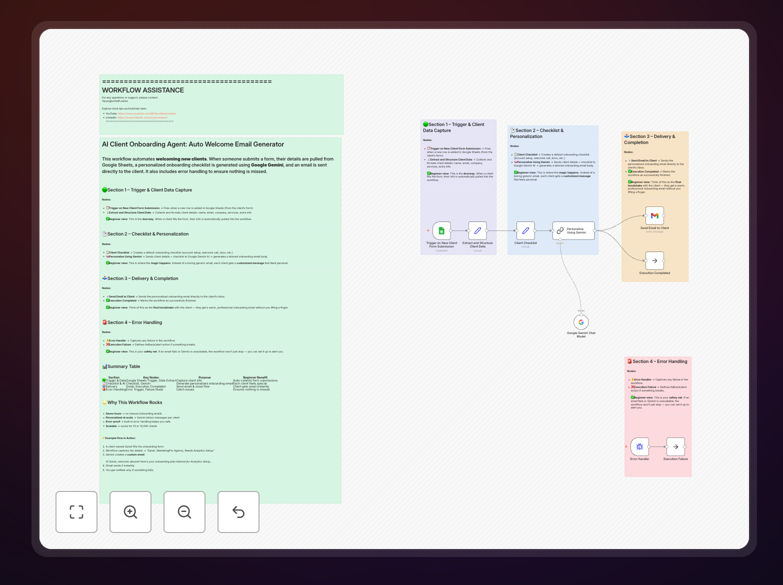
What This Workflow Does
Manual client onboarding is a time-consuming, error-prone process that often delays your ability to deliver value. When a new client submits an onboarding form, someone must manually transfer their information, draft a welcome email, and coordinate next steps—taking valuable hours away from strategic work.
This AI-powered automation solves that problem completely. It captures new client submissions from Google Forms/Sheets, structures their information, generates a personalized welcome email using Gemini AI, and sends it automatically via Gmail. The entire process happens within minutes of form submission, ensuring every client receives immediate, professional communication with a customized onboarding checklist.
The workflow acts as your 24/7 client success assistant, handling the administrative heavy lifting while maintaining a human touch through AI personalization. It eliminates the risk of missed clients, inconsistent messaging, and delayed responses that can damage client relationships before they even begin.
How It Works
1. Trigger: Capture New Client Data
The workflow activates whenever a new row is added to your Google Sheets "Onboarding" spreadsheet. This typically happens when a client submits your onboarding form through Google Forms, but it can connect to any data source that feeds into Sheets.
2. Structure: Prepare Client Information
The raw form data is cleaned and organized into a standardized format. The workflow extracts the client's name, email, company, requested services, and any additional notes. It also prepares a standard onboarding checklist with items like account setup, welcome call scheduling, and document collection.
3. Generate: AI-Personalized Email Creation
Google Gemini AI (using the 2.0 Flash model for speed) receives the structured client data and generates a professional welcome email. The AI incorporates the client's specific details, references their company and services, and inserts the personalized onboarding checklist—creating an email that feels individually crafted.
4. Deliver: Automated Email Dispatch
The generated email is automatically sent to the client's email address via Gmail with a subject line like "Welcome to Our Service, [Client Name]." The email includes the AI-generated body and maintains your professional branding.
5. Monitor: Error Handling & Success Tracking
Built-in error handling ensures any failures are logged and reported. Success notifications confirm when clients have been onboarded, providing complete transparency into the automation's performance.
Who This Is For
This workflow is ideal for service-based businesses, agencies, consultants, and SaaS companies that regularly onboard new clients. Marketing agencies, web development firms, financial advisors, legal practices, and coaching businesses will see immediate value. It's particularly valuable for teams experiencing growth where manual onboarding becomes a bottleneck, or for solo entrepreneurs who need to appear larger and more organized than they are.
Businesses using Google Workspace (Forms, Sheets, Gmail) will find this especially seamless to implement. However, the workflow can be adapted to work with alternative form tools, CRMs, and email providers through n8n's extensive integration capabilities.
What You'll Need
- n8n instance (cloud or self-hosted) with workflow execution capabilities
- Google Sheets with your client onboarding data or connected Google Form
- Google Gemini API key for AI email generation (available through Google AI Studio)
- Gmail account with API access enabled for sending automated emails
- Basic understanding of your current onboarding process and desired email structure
Pro tip: Before implementing, map out your ideal client journey from initial contact to first delivered value. This workflow handles the initial welcome, but you can extend it to trigger follow-up tasks, schedule meetings, or create project management tickets for a complete automated onboarding system.
Quick Setup Guide
- Download and import the template JSON file into your n8n instance
- Configure the Google Sheets trigger to connect to your specific onboarding spreadsheet
- Add your Google Gemini API key in the AI generation node settings
- Connect your Gmail account and set the "from" email address
- Customize the email prompt to match your brand voice and include your specific onboarding checklist items
- Test with a sample client entry to ensure the email generation and sending work correctly
- Activate the workflow and begin automating your client onboarding immediately
Key Benefits
Save 2–4 hours per client by eliminating manual data transfer, email drafting, and checklist creation. What previously required focused administrative work now happens automatically in the background.
Improve client first impressions with immediate, personalized communication. Clients receive professional welcome emails within minutes of submitting their information, signaling efficiency and attention to detail.
Ensure onboarding consistency across all clients and team members. Every client receives the same comprehensive information and clear next steps, eliminating variability in service quality.
Scale without adding staff as your client volume grows. The automation handles increased volume effortlessly, allowing you to onboard more clients without proportional increases in administrative overhead.
Reduce human error in data entry and communication. Automated processes eliminate typos, missed information, and forgotten follow-ups that can undermine professional credibility.