What This Workflow Does
This automation solves the time-consuming and costly process of creating custom visuals for business needs. Instead of hiring designers or spending hours in complex software, you describe what you want in plain English, and AI generates professional images instantly. The workflow goes further by allowing you to edit those images—adding elements, changing styles, or refining details—all through automated steps.
Perfect for marketing teams needing campaign visuals, e-commerce stores requiring product mockups, content creators building blog illustrations, or any business that regularly uses custom graphics. It transforms creative bottlenecks into scalable, on-demand visual production.
How It Works
The workflow connects OpenAI's advanced image models with your business processes through a logical sequence of steps.
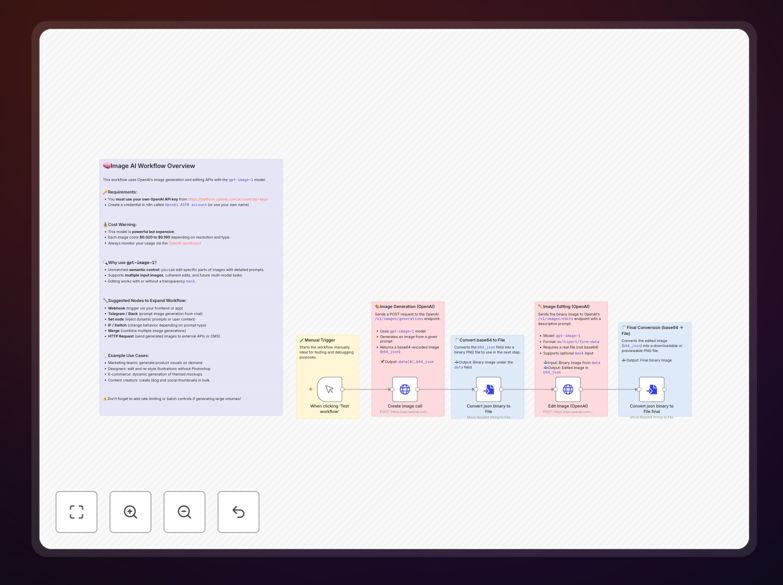
Step 1: Trigger with a Prompt
Start the workflow manually or via a webhook, providing a text description of the image you want. For example, "A modern workspace with natural light, plants, and a laptop on a wooden desk."
Step 2: Generate the Base Image
The workflow sends your prompt to OpenAI's GPT-Image-1 model, which creates a high-quality image and returns it in base64 format. This happens in seconds, with options to specify style, dimensions, and quality.
Step 3: Convert for Editing
Since OpenAI's editing endpoint requires binary files, the workflow converts the base64 image into a proper PNG file format while preserving quality and metadata.
Step 4: Apply Edits
Provide a second prompt for edits, like "Add a coffee cup and notebook beside the laptop." The workflow sends the binary image back to OpenAI with your edit instructions, generating a refined version.
Step 5: Deliver the Final Image
The edited image is converted to a downloadable file format and can be saved to cloud storage, sent via email, posted to social media, or integrated directly into your design tools.
Who This Is For
Marketing Teams creating social media graphics, ad visuals, and campaign materials daily. E-commerce Businesses needing product mockups, lifestyle shots, and promotional banners. Content Creators & Bloggers requiring custom illustrations and featured images. Startups & Small Businesses with limited design budgets but high visual needs. Product Teams visualizing concepts and creating presentation materials.
If you currently spend money on stock photos, wait for designer availability, or struggle to create consistent visuals, this automation provides an immediate solution.
What You'll Need
- OpenAI API Access: An account with access to the GPT-Image-1 model (may require organization verification).
- API Credentials: Your OpenAI API key configured in n8n's credential manager.
- n8n Instance: A self-hosted n8n setup or n8n.cloud account.
- Basic Understanding: Familiarity with n8n's interface—no programming knowledge required.
- Use Case: Clear ideas of what images you need to generate or edit regularly.
Quick Setup Guide
Get this automation running in under 15 minutes with these simple steps:
- Download the Template: Click the download button above to get the JSON file.
- Import to n8n: In your n8n instance, go to Workflows → Import from file and select the downloaded JSON.
- Configure OpenAI Credentials: Add your OpenAI API key in the credential settings for both the "Create Image" and "Edit Image" nodes.
- Test with Sample Prompts: Run the workflow manually with the example prompts provided in the template to verify everything works.
- Customize for Your Needs: Modify the prompt nodes with your specific image descriptions and edit instructions.
- Add Output Actions: Connect the final image output to storage nodes (Google Drive, Dropbox) or communication nodes (Email, Slack) as needed.
- Schedule or Trigger: Set the workflow to run on a schedule, via webhook, or integrate it with other business processes.
Pro tip: Create a library of reusable prompt templates for common image types (social posts, product shots, blog headers) to ensure brand consistency and save time on prompt engineering.
Key Benefits
Cut design costs by 80% or more by reducing dependency on external designers for routine visual creation. What used to cost hundreds per image now costs pennies in API calls.
Reduce visual production time from days to minutes, enabling faster campaign launches, quicker content publishing, and more responsive marketing. Generate dozens of variations for A/B testing in the time it used to take to create one.
Maintain complete creative control without technical design skills. Describe exactly what you want, see immediate results, and iterate until perfect—all through natural language instructions.
Scale visual content production infinitely without adding team members. Automate monthly social media calendars, product catalog expansions, or personalized marketing visuals at volume.
Integrate AI visuals seamlessly into existing workflows by connecting generated images directly to your CMS, e-commerce platform, social schedulers, or design collaboration tools.