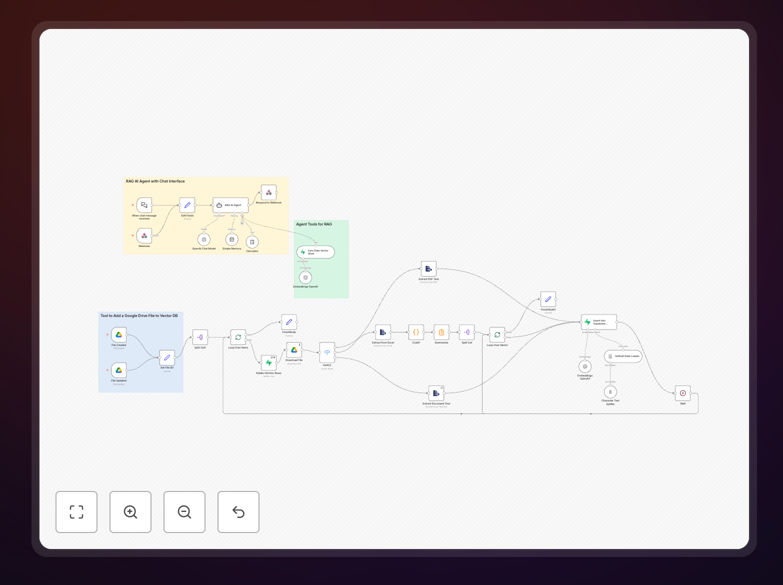
What This Workflow Does
This automation solves a common business problem: teams have valuable information trapped in documents scattered across Google Drive, but finding specific answers requires manual searching through files. The workflow creates a conversational AI assistant that can answer questions based on your company documents using Retrieval-Augmented Generation (RAG).
When new documents are added to designated Google Drive folders, the system automatically processes them—extracting text, creating searchable vector embeddings, and storing them in Pinecone's vector database. Users can then ask natural language questions through a chat interface, and the AI provides accurate answers with references to the source documents.
How It Works
1. Document Monitoring & Trigger
The workflow monitors specific Google Drive folders for new or updated files. When a document is detected, it automatically triggers the processing pipeline without manual intervention.
2. Multi-Format Processing
The system handles various file types including PDFs, Excel spreadsheets, Google Docs, and text files. It extracts the textual content while preserving structure and important formatting cues.
3. Intelligent Chunking & Embedding
Documents are intelligently split into meaningful chunks (not just arbitrary sections). Each chunk is converted into a vector embedding using AI models, creating a mathematical representation of the content's meaning.
4. Vector Storage in Pinecone
These embeddings are stored in Pinecone's specialized vector database, optimized for fast similarity searches. The database maintains the relationship between chunks and their source documents.
5. Query Processing & Response Generation
When users ask questions, the system converts the query to an embedding, finds the most relevant document chunks in Pinecone, and uses this context to generate accurate, sourced answers through the AI model.
Who This Is For
This workflow is ideal for knowledge-intensive businesses where employees regularly need to find information from internal documents. Perfect for:
- Customer Support Teams who need quick access to product documentation and troubleshooting guides
- Research Organizations with large collections of papers, reports, and findings
- Legal & Compliance Departments requiring fast retrieval from policy manuals and regulatory documents
- Sales & Marketing Teams who need instant access to case studies, product specs, and competitive intelligence
- HR Departments managing employee handbooks, training materials, and policy documents
What You'll Need
- Google Drive Account with documents you want to make searchable
- OpenAI API Key for text processing and embedding generation
- Pinecone Account for vector storage and similarity search
- Supabase Account (optional, for enhanced metadata storage)
- n8n Instance (cloud or self-hosted) to run the workflow
Quick Setup Guide
Follow these steps to implement this automation in your business:
- Download the template using the button above and import it into your n8n instance
- Configure credentials for Google Drive, OpenAI, and Pinecone in n8n's credential management
- Set folder paths to specify which Google Drive folders should be monitored
- Test the workflow by adding a sample document to your monitored folder
- Deploy the webhook to create the chat interface for your team
- Train your team on how to use the new document chatbot
Pro tip: Start with a small, well-organized folder of documents for your initial implementation. This allows you to test accuracy and refine chunking settings before scaling to your entire document library.
Key Benefits
Reduce document search time by 70-80%. Employees spend an average of 1.8 hours daily searching for information. This automation provides instant answers, saving approximately 9 hours per employee each week.
Improve answer accuracy with sourced references. Unlike general AI chatbots that may hallucinate, this system provides answers based specifically on your company documents, complete with source citations for verification.
Automatically scale with your document library. As new documents are added to Google Drive, they're automatically processed and added to the knowledge base without manual intervention.
Support multiple file formats simultaneously. The system handles PDFs, spreadsheets, documents, and presentations in a unified workflow, eliminating format conversion headaches.
Enable 24/7 access to company knowledge. Team members can get answers anytime without waiting for subject matter experts to be available, accelerating decision-making across time zones.