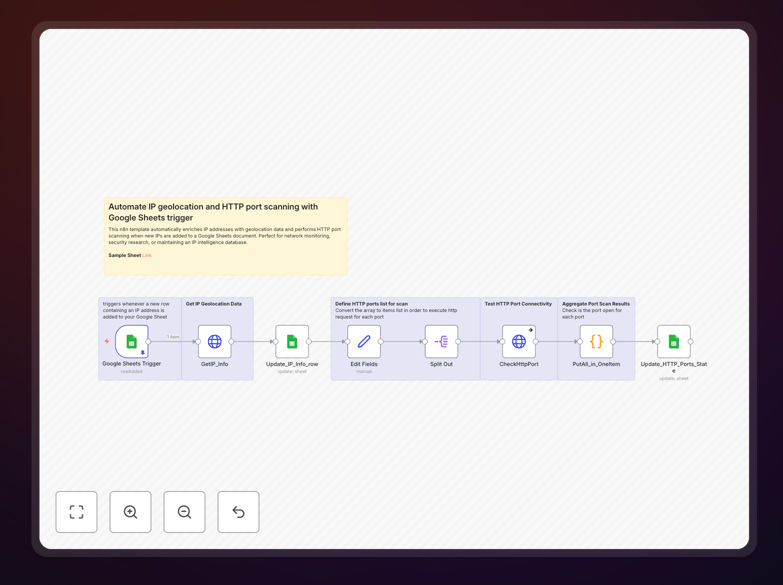
What This Workflow Does
This n8n workflow automates the process of enriching IP addresses with geolocation data and scanning for open HTTP ports. It's designed for security teams, IT administrators, and network analysts who need to quickly analyze IP addresses from various sources.
The workflow triggers whenever new IP addresses are added to a Google Sheet, then automatically looks up geolocation details (country, city, ISP) and scans for open HTTP ports (80, 443). The enriched data is then written back to your spreadsheet, creating a comprehensive security analysis dashboard.
How It Works
1. Google Sheets Trigger
The workflow monitors a specific Google Sheet for new IP address entries. When a new row is added, the workflow automatically processes the IP data.
2. IP Geolocation Lookup
Each IP address is sent to a geolocation API (like IPAPI or IP2Location) to retrieve detailed location information including country, city, region, ISP, and coordinates.
3. Port Scanning
The workflow then checks common HTTP ports (80 and 443) to determine if they're open, helping identify potential web services running on the IP.
4. Data Enrichment
All gathered information is combined and written back to your Google Sheet, creating a complete security profile for each IP address.
Who This Is For
This automation is ideal for:
- Security teams monitoring suspicious IP activity
- IT administrators tracking network access attempts
- Fraud prevention teams analyzing transaction origins
- Network analysts investigating traffic patterns
- DevOps engineers automating security workflows
Pro tip: Combine this with your SIEM system to automatically flag IPs from high-risk locations or with unexpected open ports.
What You'll Need
- An n8n instance (cloud or self-hosted)
- A Google Sheet with IP addresses to analyze
- Google Cloud credentials with Sheets API access
- A geolocation API key (free tiers available from most providers)
Quick Setup Guide
- Download the template file
- Import into your n8n instance
- Connect your Google Sheets account
- Configure your geolocation API credentials
- Set the sheet ID and range to monitor
- Activate the workflow
Key Benefits
Save hours of manual investigation by automating IP analysis that would normally require multiple tools and copy-pasting between systems.
Improve security response times with real-time enrichment of IP data as soon as it's logged in your systems.
Centralize security intelligence by bringing geolocation and port scanning data directly into your existing Google Sheets workflows.
Scale your analysis capabilities to handle hundreds of IPs simultaneously without additional manual effort.
Create audit-ready records with automatically timestamped and documented IP investigations.