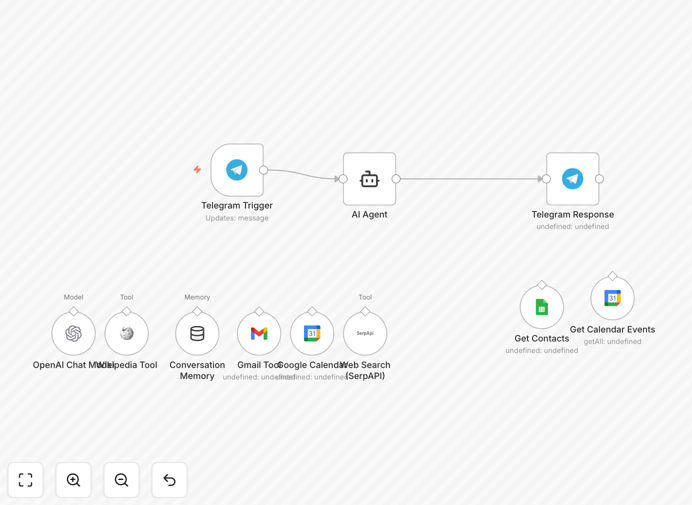
What This Workflow Does
This automation transforms your Telegram messenger into a comprehensive AI personal assistant that handles your daily administrative tasks through natural conversation. Instead of juggling multiple apps to check your schedule, find contact information, or send emails, you simply message your Telegram bot as you would a human assistant.
The workflow connects Telegram with Google Calendar, Gmail, Google Sheets, OpenAI's GPT-4o-mini, and web search APIs to create a unified productivity system. It proactively sends you daily schedule summaries, finds contact information before you need it, answers questions using web research, and manages your communications—all through the familiar Telegram interface you already use.
How It Works
Step 1: Telegram Message Reception
When you send a message to your Telegram bot, the workflow triggers and processes your natural language request. The system understands context from previous conversations thanks to built-in memory functionality.
Step 2: AI Intent Recognition
OpenAI's GPT-4o-mini analyzes your message to determine what you're asking for—whether it's checking your calendar, finding a contact, sending an email, or searching for information online.
Step 3: Multi-Tool Execution
Based on the recognized intent, the workflow accesses the appropriate tools: Google Calendar for scheduling, Google Sheets for contacts, Gmail for email sending, Wikipedia for knowledge, or SerpAPI for web searches.
Step 4: Response Generation & Delivery
The AI compiles information from all relevant sources into a coherent, helpful response and sends it back through Telegram. For scheduled tasks like daily summaries, the system runs automatically at predetermined times.
Who This Is For
This template is ideal for busy professionals, entrepreneurs, small business owners, and productivity enthusiasts who want to streamline their daily workflow. If you frequently switch between calendar apps, contact lists, and communication tools, this AI assistant eliminates that context switching.
Executives who need quick access to their schedule during meetings, sales professionals who regularly look up contact information, and remote teams coordinating across time zones will find particular value. The system works equally well for individuals managing personal productivity or teams needing shared assistant functionality.
What You'll Need
- Telegram Account & Bot Token: Create a free bot via @BotFather on Telegram
- Google Cloud Project: With Calendar, Gmail, and Sheets APIs enabled
- OpenAI API Key: For GPT-4o-mini AI capabilities
- SerpAPI Account: For web search functionality (freemium available)
- n8n Instance: Either self-hosted or n8n Cloud account
- Google Sheets Document: With your contacts organized (template provided)
Pro tip: Start with the free tiers of each service to test the workflow before committing to paid plans. Most APIs offer generous free allowances for personal or light business use.
Quick Setup Guide
1. Download the template using the button above and import it into your n8n instance.
2. Configure Telegram credentials with your bot token from @BotFather.
3. Set up Google OAuth2 for Calendar, Gmail, and Sheets using credentials from Google Cloud Console.
4. Add your API keys for OpenAI and SerpAPI in the respective credential nodes.
5. Update the Google Sheets ID to point to your contacts spreadsheet.
6. Modify the calendar ID to use your primary Google Calendar.
7. Activate the workflow and test by messaging your Telegram bot.
Key Benefits
Save 1-2 hours daily by eliminating app switching and manual lookups. Everything you need is accessible through a single Telegram conversation.
Never miss appointments with automatic daily schedule emails sent each morning. The system proactively keeps you informed rather than requiring you to check.
Instant contact access means you can find email addresses and information in seconds instead of searching through multiple databases or asking colleagues.
Reduce administrative errors by having AI handle the details. The system consistently follows the same process without forgetting steps or making typos.
Scale your productivity without hiring additional staff. The AI assistant works 24/7 without breaks, handling routine tasks so you can focus on strategic work.