What This Workflow Does
This automation transforms your everyday Telegram messenger into a powerful, multi-modal personal or team assistant. Instead of switching between multiple apps and manually performing repetitive tasks, you can now interact naturally with an AI that understands your intent and executes actions across your productivity stack.
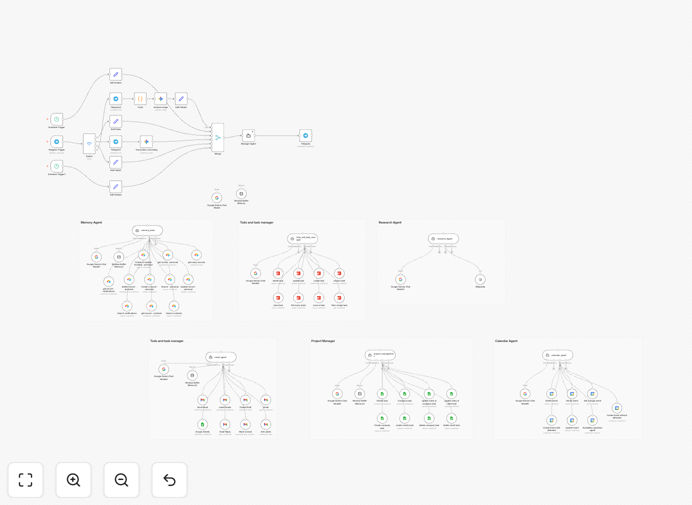
The workflow creates an intelligent agent powered by Google Gemini that can process text messages, voice notes, photos, and documents. It connects to your Google Calendar, Gmail, Todoist, Airtable, and other tools to manage your schedule, handle emails, track tasks, maintain knowledge bases, and provide research—all through simple Telegram conversations.
At its core, a Manager Agent interprets complex requests, delegates to specialized sub-agents, and delivers coherent responses while maintaining conversation memory. This eliminates the friction of manual tool switching and creates a unified command center accessible from your phone or desktop.
How It Works
1. Multi-Modal Input Processing
The Telegram Trigger node receives all incoming messages. A Switch node intelligently routes different content types: voice notes get transcribed, images are converted for analysis, documents have text extracted, and text messages proceed directly. This preprocessing ensures the AI receives structured input regardless of how you communicate.
2. Intelligent Request Interpretation
The unified prompt reaches the Google Gemini-powered Manager Agent, which analyzes the user's intent using conversation context from a window buffer memory. The agent determines which tools are needed—whether it's checking calendars, creating tasks, searching information, or updating records.
3. Specialized Agent Orchestration
The Manager Agent delegates to appropriate sub-agents: the memory agent saves/recalls information from Airtable, the task agent manages Todoist, the email agent handles Gmail, the calendar agent schedules events, and research agents fetch data. Each specialist performs its function efficiently.
4. Action Execution & Response
After completing the required actions, the Manager Agent formulates a natural language response and sends it back through Telegram. The system maintains conversation history, allowing follow-up questions without repeating context—creating a truly conversational experience.
Who This Is For
This template is ideal for entrepreneurs, small business owners, remote teams, executives, and professionals who juggle multiple productivity tools. Specifically, it benefits those who want to:
- Manage their schedule and tasks through natural conversation instead of app hopping
- Process documents and images received via messaging apps without manual data entry
- Maintain a searchable knowledge base of conversations, decisions, and reference materials
- Provide team members with an AI assistant for common operational queries
- Automate customer interactions that involve multiple steps across different systems
It's particularly valuable for field service teams, consultants, agency owners, and anyone who receives information through various channels but needs it organized into business systems.
What You'll Need
- Telegram Bot Token – Create via BotFather in Telegram
- Google Gemini API Key – From Google AI Studio
- Google Workspace Credentials – For Gmail, Calendar, and Sheets access
- Airtable Base & API Key – For knowledge base functionality
- Todoist API Token – For task management features
- n8n Instance – Cloud or self-hosted (free tier works)
- Webhook URL – For Telegram bot communication
Pro tip: Start with just Telegram and Google Gemini to test basic functionality, then gradually add other integrations as you become comfortable with the workflow structure.
Quick Setup Guide
- Import the template – Download the JSON file and import it into your n8n instance
- Configure Telegram – Add your Bot Token to all Telegram nodes and set up the webhook
- Add Google Gemini – Insert your API key in the Google Gemini nodes
- Connect productivity tools – Add credentials for Gmail, Calendar, Todoist, and Airtable
- Set conversation memory – Verify the Session Key uses Telegram chat ID for multi-user support
- Test basic functionality – Send "Hello" to your bot and ensure you get a response
- Expand capabilities – Gradually test voice, image, and document processing
Estimated setup time is 30-60 minutes if you have all API keys ready, or 2-3 hours for first-time configuration including service setup and permissions.
Key Benefits
Save 10-15 hours weekly by eliminating manual switching between email, calendar, task manager, and messaging apps. The assistant handles cross-tool workflows automatically.
Reduce human error in data entry and scheduling. The AI consistently follows rules and validates information before taking actions.
24/7 availability for task management and information retrieval. Your assistant works outside business hours, processing requests as they arrive.
Unified command center accessible from any device with Telegram installed. No need for separate logins to multiple business applications.
Scalable team support with separate conversation contexts for different users. The same automation can serve your entire organization.