Telegram Google Gemini AI Assistant Productivity n8n

Multi-modal AI Assistant with Telegram & Google Gemini

Transform your Telegram messenger into an intelligent personal assistant that understands text, voice, images, and documents—connected to your productivity tools.

Download Template JSON · n8n compatible · Free
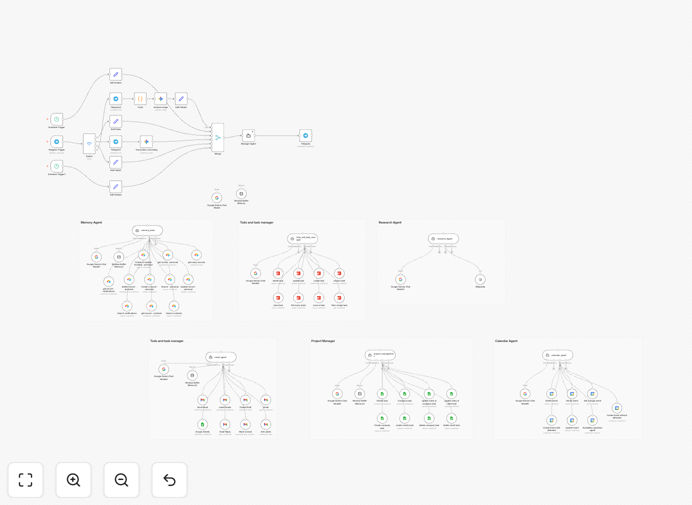
Visual diagram showing Telegram connected to Google Gemini AI with workflow automation

What This Workflow Does

This automation transforms your everyday Telegram messenger into a powerful, multi-modal personal or team assistant. Instead of switching between multiple apps and manually performing repetitive tasks, you can now interact naturally with an AI that understands your intent and executes actions across your productivity stack.

The workflow creates an intelligent agent powered by Google Gemini that can process text messages, voice notes, photos, and documents. It connects to your Google Calendar, Gmail, Todoist, Airtable, and other tools to manage your schedule, handle emails, track tasks, maintain knowledge bases, and provide research—all through simple Telegram conversations.

At its core, a Manager Agent interprets complex requests, delegates to specialized sub-agents, and delivers coherent responses while maintaining conversation memory. This eliminates the friction of manual tool switching and creates a unified command center accessible from your phone or desktop.

How It Works

1. Multi-Modal Input Processing

The Telegram Trigger node receives all incoming messages. A Switch node intelligently routes different content types: voice notes get transcribed, images are converted for analysis, documents have text extracted, and text messages proceed directly. This preprocessing ensures the AI receives structured input regardless of how you communicate.

2. Intelligent Request Interpretation

The unified prompt reaches the Google Gemini-powered Manager Agent, which analyzes the user's intent using conversation context from a window buffer memory. The agent determines which tools are needed—whether it's checking calendars, creating tasks, searching information, or updating records.

3. Specialized Agent Orchestration

The Manager Agent delegates to appropriate sub-agents: the memory agent saves/recalls information from Airtable, the task agent manages Todoist, the email agent handles Gmail, the calendar agent schedules events, and research agents fetch data. Each specialist performs its function efficiently.

4. Action Execution & Response

After completing the required actions, the Manager Agent formulates a natural language response and sends it back through Telegram. The system maintains conversation history, allowing follow-up questions without repeating context—creating a truly conversational experience.

Who This Is For

This template is ideal for entrepreneurs, small business owners, remote teams, executives, and professionals who juggle multiple productivity tools. Specifically, it benefits those who want to:

  • Manage their schedule and tasks through natural conversation instead of app hopping
  • Process documents and images received via messaging apps without manual data entry
  • Maintain a searchable knowledge base of conversations, decisions, and reference materials
  • Provide team members with an AI assistant for common operational queries
  • Automate customer interactions that involve multiple steps across different systems

It's particularly valuable for field service teams, consultants, agency owners, and anyone who receives information through various channels but needs it organized into business systems.

What You'll Need

  1. Telegram Bot Token – Create via BotFather in Telegram
  2. Google Gemini API Key – From Google AI Studio
  3. Google Workspace Credentials – For Gmail, Calendar, and Sheets access
  4. Airtable Base & API Key – For knowledge base functionality
  5. Todoist API Token – For task management features
  6. n8n Instance – Cloud or self-hosted (free tier works)
  7. Webhook URL – For Telegram bot communication

Pro tip: Start with just Telegram and Google Gemini to test basic functionality, then gradually add other integrations as you become comfortable with the workflow structure.

Quick Setup Guide

  1. Import the template – Download the JSON file and import it into your n8n instance
  2. Configure Telegram – Add your Bot Token to all Telegram nodes and set up the webhook
  3. Add Google Gemini – Insert your API key in the Google Gemini nodes
  4. Connect productivity tools – Add credentials for Gmail, Calendar, Todoist, and Airtable
  5. Set conversation memory – Verify the Session Key uses Telegram chat ID for multi-user support
  6. Test basic functionality – Send "Hello" to your bot and ensure you get a response
  7. Expand capabilities – Gradually test voice, image, and document processing

Estimated setup time is 30-60 minutes if you have all API keys ready, or 2-3 hours for first-time configuration including service setup and permissions.

Key Benefits

Save 10-15 hours weekly by eliminating manual switching between email, calendar, task manager, and messaging apps. The assistant handles cross-tool workflows automatically.

Reduce human error in data entry and scheduling. The AI consistently follows rules and validates information before taking actions.

24/7 availability for task management and information retrieval. Your assistant works outside business hours, processing requests as they arrive.

Unified command center accessible from any device with Telegram installed. No need for separate logins to multiple business applications.

Scalable team support with separate conversation contexts for different users. The same automation can serve your entire organization.

Frequently Asked Questions

Common questions about AI assistant automation and integration

A multi-modal AI assistant can understand and process different types of input like text, voice, images, and documents, then take intelligent actions. For businesses, this means automating customer support, processing invoices from photos, managing schedules from voice commands, and handling document workflows without manual intervention.

Unlike single-purpose bots, these assistants connect multiple business systems. For example, a field technician could send a photo of equipment, and the AI would log it in maintenance records, schedule follow-up, and notify procurement if parts are needed—all from one interaction.

Integrating Telegram with Google Gemini creates a conversational AI interface accessible from anywhere. Employees can send voice notes, photos of documents, or text queries directly in Telegram, and the AI processes them through Google Gemini to perform tasks like scheduling meetings, sending emails, or retrieving information from databases.

This combination leverages Telegram's excellent mobile experience with Gemini's advanced reasoning capabilities. The result is reduced app switching, faster task completion, and natural interaction that doesn't require learning new software interfaces.

AI automation for productivity tools saves 10-15 hours weekly by handling repetitive tasks, reduces human error in data entry, provides 24/7 availability for task management, and creates unified workflows across multiple apps. It transforms reactive work into proactive assistance where the AI anticipates needs based on context.

Beyond time savings, these systems improve work quality through consistency and create audit trails of all actions. They also scale easily—the same automation that helps one person can support an entire team with minimal additional configuration.

Setting up a multi-tool AI assistant requires connecting APIs, configuring authentication, and designing workflow logic. With pre-built templates like this one, technical complexity reduces significantly, but you still need API keys and basic configuration. For complex custom needs, professional automation services ensure reliable implementation.

The initial setup follows a logical progression: start with core AI functionality, add one integration at a time, test thoroughly, then expand. Most businesses can have a basic assistant running within a day, with refinement occurring over subsequent weeks as use cases evolve.

Yes, when properly configured. The assistant operates within your existing tool permissions and can be designed with data privacy controls. For sensitive operations, implement encryption, access logging, and restrict AI access to only necessary data. Self-hosted automation platforms offer additional security over cloud-only solutions.

Best practices include using service accounts with minimal permissions, encrypting stored credentials, implementing user authentication layers, and maintaining audit logs of all AI actions. For regulated industries, additional compliance measures may be required.

Simple chatbots follow predefined rules and responses, while intelligent AI assistants understand context, learn from interactions, make decisions, and execute actions across multiple systems. An AI assistant can analyze a photo of a receipt, extract data, log it in accounting software, and notify relevant team members—all autonomously.

The key distinction is agency: chatbots respond, while assistants act. This workflow creates an assistant that doesn't just answer questions but completes tasks, updates records, communicates with other systems, and maintains persistent memory of interactions.

Businesses use Telegram automation for customer onboarding sequences, order status updates, team task assignments, document processing workflows, and internal knowledge base queries. The platform's multimedia support makes it ideal for field teams to send photos/videos that trigger backend processes without manual data entry.

Advanced implementations include inventory management via photo recognition, quality control reporting, remote equipment monitoring, and automated customer support with escalation paths. Telegram's global reach and reliability make it suitable for both internal and external business communications.

Yes, GrowwStacks specializes in building custom multi-modal AI automations tailored to specific business needs. We analyze your workflows, integrate your existing tools, and create intelligent assistants that handle your unique processes. From simple Telegram bots to complex enterprise AI orchestrators, we deliver solutions that save time and reduce operational costs.

Our process includes discovery sessions to identify automation opportunities, phased implementation to ensure value delivery at each stage, and ongoing support as your needs evolve. We focus on creating assistants that work alongside your team, enhancing productivity without disrupting existing workflows.

  • Custom integration with your existing software stack
  • Industry-specific workflow design
  • Security and compliance considerations
  • Training and documentation for your team

Need a Custom Multi-modal AI Automation?

This free template is a starting point. Our team builds fully tailored automation systems for your specific business needs.