Email Automation AI Translation Slack Approval Customer Support n8n

Multilingual Email Auto-Replies with AI & Human Approval

Automatically translate, draft, and get approval for email responses in any language—cutting response time by 80%.

Download Template JSON · n8n compatible · Free
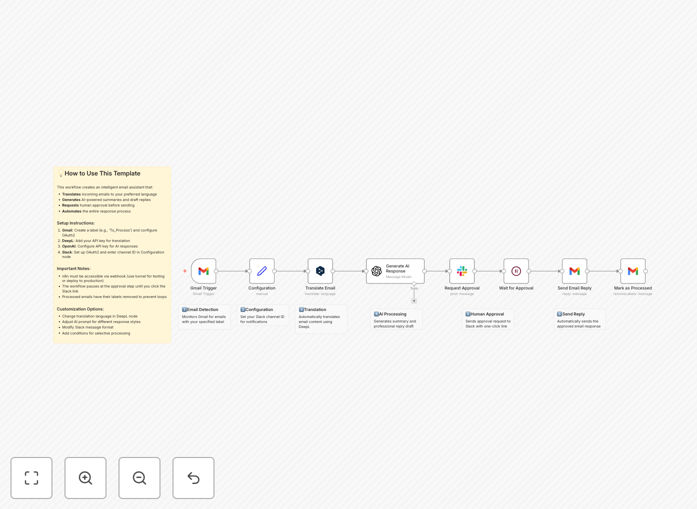
Visual diagram showing multilingual email automation workflow with Gmail, DeepL, OpenAI, and Slack integration

What This Workflow Does

For businesses operating internationally, customer emails arrive in multiple languages. Manually translating, drafting replies, and getting approvals creates massive delays and inconsistent quality. This workflow solves that by creating a seamless, automated pipeline that handles the entire process—from detecting a new email to sending a polished, approved reply.

The system monitors your Gmail for labeled emails, uses DeepL for professional-grade translation, leverages GPT-4o to generate a context-aware draft reply, sends that draft to a designated Slack channel for one-click human approval, and finally dispatches the approved response—all while removing the label to prevent duplicates. It turns a multi-hour, multi-person task into a 5-minute review.

How It Works

Step 1: Trigger on New Labeled Email

The workflow watches for emails tagged with a specific Gmail label (like “To_Process”). When a matching email arrives, it extracts the sender, subject, and body content, then passes this data to the next stage.

Step 2: Translate Content with DeepL

The email body is sent to the DeepL API for accurate translation into your team’s working language. DeepL specializes in nuanced, business-appropriate translation across dozens of languages, far surpassing generic tools.

Step 3: Generate Draft Reply with GPT-4o

The translated email, along with sender context and any custom instructions, is fed to OpenAI’s GPT-4o. The AI generates a professional, empathetic, and actionable draft reply that addresses the customer’s core query.

Step 4: Request Human Approval via Slack

A summary of the email and the AI-generated draft is posted to a designated Slack channel. Team members can review and click an “Approve” button (via a secure webhook) or request edits. This ensures quality control and human oversight.

Step 5: Send Approved Reply & Clean Up

Once approved, the workflow sends the reply from your Gmail account, logs the action, and removes the original processing label to ensure the same email isn’t handled twice. The entire loop is complete.

Who This Is For

This automation is ideal for customer support teams at e‑commerce or SaaS companies with global users, sales representatives managing international leads, professional service firms (legal, consulting) communicating with overseas clients, and any business where timely, polished multilingual communication impacts customer satisfaction and revenue.

If your team spends more than an hour a day translating emails or crafting individual responses for non‑English inquiries, this workflow will save significant time and reduce mental load.

What You'll Need

  1. A Gmail account (or Google Workspace) with API access enabled.
  2. A DeepL API key (free tier available for moderate usage).
  3. An OpenAI API key with access to GPT-4o or GPT-4.
  4. A Slack workspace where you can create an app for posting messages and receiving button interactions.
  5. An n8n instance (cloud or self‑hosted) that can expose a webhook URL for the Slack approval callback.
  6. Basic familiarity with n8n credential setup (OAuth2 for Gmail & Slack).

Pro tip: Start by testing the workflow with a low‑volume, non‑critical Gmail label. This lets you refine the AI prompts and approval process without risking important customer communication.

Quick Setup Guide

  1. Import the template: Download the JSON file above and import it into your n8n instance.
  2. Configure credentials: Set up OAuth2 for Gmail and Slack, and add API keys for DeepL and OpenAI in n8n’s credentials panel.
  3. Update configuration nodes: Change the Gmail label name, target translation language, and Slack channel ID to match your environment.
  4. Set up webhook: Ensure your n8n instance is accessible via a public URL (using n8n.cloud, a tunnel, or your own domain) so Slack can send approval callbacks.
  5. Test with a real email: Label an existing email in your Gmail and trigger the workflow manually to verify the entire flow works.

Key Benefits

Reduce first‑response time by 80%. Instead of waiting for a bilingual team member to be available, emails are translated and drafted instantly, waiting only for a quick approval.

Ensure consistent quality across languages. Every reply follows the same AI‑assisted structure and tone, eliminating variability when different team members handle translations.

Scale your support capacity without hiring. One team member can oversee replies in dozens of languages, effectively multiplying your support bandwidth.

Maintain human oversight on every message. The mandatory Slack approval step prevents AI errors, preserves your brand voice, and gives your team final control.

Eliminate repetitive, low‑value translation work. Free your team from manual copy‑pasting into translation tools, allowing them to focus on complex customer issues.

Frequently Asked Questions

Common questions about multilingual email automation and integration

Automation drastically improves multilingual support by instantly translating incoming emails, generating context-aware draft replies with AI, and routing them for quick human approval. This reduces response time from hours to minutes, ensures consistent quality across languages, and frees your team from manual translation tasks.

Businesses handling international clients see a 70% reduction in first-response time and eliminate language barrier bottlenecks. The system works 24/7, ensuring no inquiry sits unanswered overnight due to timezone or language constraints.

Combining AI translation with human approval gives you the speed of automation with the nuance and quality control of a human agent. AI handles the heavy lifting of translation and initial draft creation, while your team reviews the tone, accuracy, and business context before sending.

This hybrid approach prevents embarrassing translation errors, maintains brand voice, and ensures sensitive or complex inquiries get the right attention, all while scaling your capacity. It's the best of both worlds—efficiency and quality.

For professional business communication, using a specialized translation AI like DeepL alongside a general AI like GPT-4o is the optimal strategy. DeepL excels at accurate, nuanced language translation between dozens of languages, often outperforming generic tools in business contexts.

GPT-4o is superior at understanding context, intent, and generating a natural-sounding reply draft based on the translated content. Using both tools together gives you the highest quality output—accurate translation plus intelligent, context-aware response drafting.

Maintaining quality and brand voice requires a structured workflow. First, use AI to translate and draft, but always include specific instructions in your prompt about tone, style, and key phrases. Second, implement a mandatory human approval step where a team member can review, edit, or reject the draft.

Third, regularly audit sent emails and refine your AI prompts based on what works. This creates a feedback loop that improves automation over time. Many companies also create a "style guide" for the AI that includes sample responses and prohibited phrases.

E-commerce companies with international customers, SaaS businesses serving global users, professional service firms (legal, consulting), travel and hospitality providers, and any B2B company with cross-border clients benefit immensely.

If you receive customer inquiries, support tickets, or sales questions in multiple languages regularly, and your team spends significant time translating or crafting individual replies, automation can save 10-15 hours per week per team member while improving response consistency.

Yes, a well-designed automation workflow can integrate with virtually any CRM, helpdesk, or business system. Instead of Gmail, the trigger could be a new ticket in Zendesk, Freshdesk, or HubSpot. The approval step can happen within those platforms or via Slack/MS Teams.

The final reply can be logged back to the CRM as a note or sent directly from the helpdesk. The core pattern—detect, translate, draft, approve, respond—works across any communication channel your business uses. n8n has native integrations for hundreds of platforms.

Common pitfalls include over-automating sensitive conversations, not having clear escalation paths for complex issues, using generic AI prompts that produce bland replies, and failing to update the system as your products or policies change.

To avoid these, start with non-critical email categories, always include a human review step, customize AI prompts with your company's specific knowledge, and assign someone to monitor and tune the automation weekly for the first month. Treat it as a learning system, not a set-and-forget tool.

Yes, GrowwStacks specializes in building custom multilingual automation systems tailored to your specific business workflows, tools, and quality standards. We can integrate with your existing CRM, helpdesk, or internal systems, design approval workflows that match your team's structure, and train the AI on your company's knowledge base.

We handle the technical implementation so you get a turnkey solution that works from day one. Our process includes discovery, prototyping, testing with your team, and full deployment with documentation and support.

  • Integration with your current tech stack (Salesforce, Zendesk, etc.)
  • Custom AI prompt engineering for your brand voice
  • Ongoing optimization and maintenance support

Need a Custom Multilingual Email Automation?

This free template is a starting point. Our team builds fully tailored automation systems for your specific business needs.