What This Workflow Does
This n8n workflow automates the entire post‑purchase customer communication lifecycle. It transforms a manual, error‑prone process into a seamless, timed sequence that nurtures customers from the moment they order through to becoming repeat buyers.
For e‑commerce stores, SaaS companies, or any business selling products online, following up after a purchase is critical for satisfaction and retention. This workflow detects new orders in your Postgres database, sends an immediate confirmation email via Gmail, waits for delivery confirmation, dispatches AI‑generated product usage tips, and finally sends personalized upsell recommendations—all without a single manual click.
By connecting your database, email service, and OpenAI, you ensure every customer receives timely, relevant, and helpful communication that increases loyalty and drives repeat revenue.
How It Works
The automation runs on a schedule and moves through four intelligent stages.
1. Order Detection & Confirmation
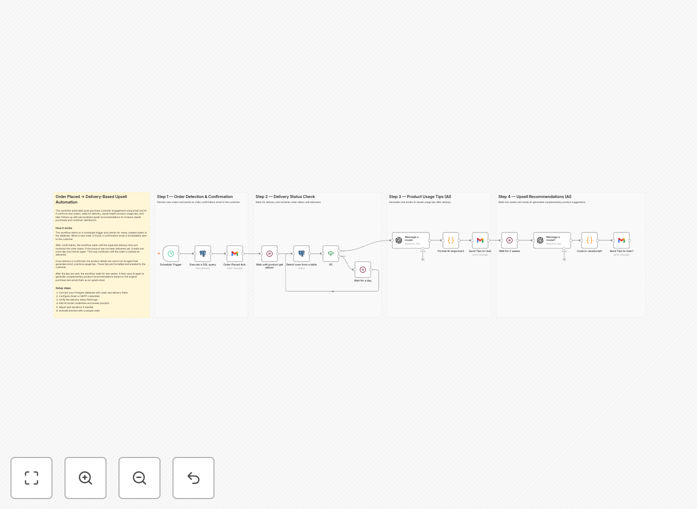
A Schedule Trigger node runs at your chosen interval (e.g., every hour). It activates a Postgres node that executes a SQL query to fetch recently created orders that haven’t yet been processed. For each new order, the workflow uses the Gmail node to send a branded order confirmation email to the customer, including their order details and expected timeline.
2. Delivery Status Monitoring
A Wait node pauses the workflow until the expected delivery window has passed. Then, another Postgres node checks the delivery status of that specific order. An If node evaluates whether the product is marked as “delivered.” If not, the workflow waits another day and checks again, ensuring tips are only sent after the customer has the product in hand.
3. AI‑Generated Product Usage Tips
Once delivery is confirmed, an OpenAI node generates short, practical tips for using the purchased product. You can customize the prompt to include product name, category, or customer history. A Code node then formats the AI output into clean HTML bullet points. Finally, Gmail sends this helpful, personalized email to boost customer success and reduce support queries.
4. Smart Upsell Recommendations
After a configurable delay (e.g., two weeks), another Wait node triggers. A second OpenAI call analyzes the initial purchase and suggests complementary products or upgrades. The Code node structures these recommendations, and Gmail dispatches a tailored upsell email, turning satisfied customers into repeat buyers.
Pro tip: Use dynamic data from your Postgres table (like product category, customer tier, or purchase value) to personalize the OpenAI prompts. This makes each email feel uniquely crafted for that customer.
Who This Is For
This template is ideal for e‑commerce managers, customer success teams, and founders who sell physical or digital products and want to systemize their post‑purchase communication. It’s especially valuable if you:
- Manually send order confirmations and follow‑up emails.
- Struggle to provide timely usage guidance after delivery.
- Want to increase repeat purchases with data‑driven recommendations.
- Use Postgres (or a similar SQL database) to store orders and a Gmail/Google Workspace account for email.
- Are looking to integrate AI‑generated content into customer touchpoints.
What You'll Need
- An n8n instance (cloud or self‑hosted).
- Postgres database with an orders table containing at least: order ID, customer email, product details, order date, and delivery status.
- Gmail or Google Workspace account with API access enabled.
- OpenAI API key (GPT‑3.5‑turbo or GPT‑4).
- Basic understanding of SQL queries and n8n node configuration.
Quick Setup Guide
Import and configure this workflow in under 15 minutes.
- Download the template using the button above and import it into your n8n workspace.
- Connect your Postgres database by adding your host, database, user, and password in the Postgres nodes. Update the SQL queries to match your table schema.
- Set up Gmail OAuth2 credentials in the Gmail nodes and authenticate with your Google account.
- Add your OpenAI API key in the OpenAI nodes and adjust the prompts to match your brand voice.
- Configure the Schedule Trigger to run at your desired frequency (e.g., every 30 minutes).
- Test with a recent order by activating the workflow and verifying emails are sent correctly.
Key Benefits
Eliminate manual follow‑ups. Save 5‑10 hours per week previously spent drafting and sending post‑purchase emails. The workflow runs unattended, ensuring no customer slips through the cracks.
Boost customer satisfaction. Timely, relevant communication makes customers feel valued. AI‑generated tips help them get more value from their purchase, reducing support tickets and increasing product success.
Increase repeat purchase rate. Data‑driven upsell emails delivered at the optimal moment can lift repeat revenue by 15‑25%. The workflow turns one‑time buyers into loyal, returning customers.
Ensure consistency and accuracy. Automated sequences remove human error—no forgotten emails, wrong product details, or missed delivery status checks. Every customer receives the same high‑quality experience.
Scale effortlessly. Whether you process 10 or 10,000 orders a month, the workflow handles the volume without additional effort. Add more steps or channels as your business grows.