Zendesk Freshdesk Google Sheets Slack Gmail

Track Support Performance Metrics Across Zendesk & Freshdesk

Automatically consolidate ticket data into unified dashboards with KPI calculations and alerts

Download Template JSON · n8n compatible · Free
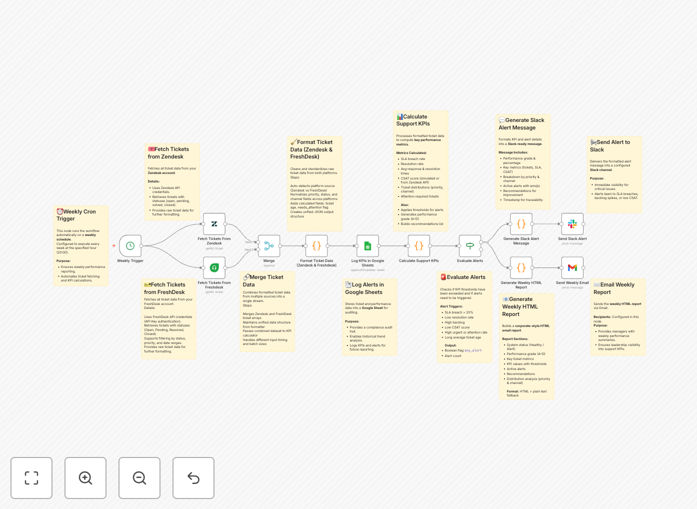
Workflow diagram showing Zendesk and Freshdesk integration with Google Sheets and Slack

What This Workflow Does

This automation solution solves the common challenge of managing support performance across multiple ticketing platforms. By connecting Zendesk and Freshdesk, it creates a unified view of your support operations with calculated KPIs, automated alerts, and scheduled reports.

The workflow runs weekly to fetch tickets from both platforms, normalizes the data into a consistent format, calculates key performance indicators, logs everything to Google Sheets for historical tracking, sends real-time Slack alerts for critical issues, and generates professional email reports for management review.

How It Works

Step 1: Data Collection

The workflow retrieves ticket data from both Zendesk and Freshdesk APIs, including ticket details, response times, resolution status, and customer satisfaction scores.

Step 2: Data Normalization

Ticket data from both platforms is standardized into a common format, mapping different statuses, priorities, and categories to enable apples-to-apples comparison.

Step 3: KPI Calculation

Key metrics are calculated including first response time, resolution time, SLA compliance rates, customer satisfaction trends, and ticket volume patterns.

Step 4: Alert Evaluation

The system checks for critical conditions like SLA breaches, low satisfaction scores, or unusual ticket volume spikes that require immediate attention.

Step 5: Reporting & Notification

Formatted Slack messages are sent to relevant teams, and comprehensive weekly reports are emailed to stakeholders with performance grades and recommendations.

Who This Is For

This workflow is ideal for:

  • Support managers overseeing teams using both Zendesk and Freshdesk
  • Customer success leaders needing visibility into support performance
  • Operations teams managing SLAs across multiple platforms
  • Executives requiring consolidated reporting on customer support
  • Companies transitioning between support platforms

What You'll Need

  1. Active Zendesk account with API access
  2. Active Freshdesk account with API access
  3. Google Sheets prepared for data logging
  4. Slack workspace for receiving alerts
  5. Gmail account for sending reports
  6. n8n instance (cloud or self-hosted)

Pro tip: Create a dedicated Google Sheet template with pre-formatted tabs for each metric category before implementing this workflow.

Quick Setup Guide

  1. Download the template file
  2. Import into your n8n instance
  3. Configure Zendesk and Freshdesk API connections
  4. Set up Google Sheets, Slack and Gmail integrations
  5. Adjust alert thresholds to match your SLAs
  6. Test with sample data
  7. Schedule to run weekly

Key Benefits

Time savings: Reduces manual reporting work by 10+ hours per week by automating data collection and analysis.

Improved visibility: Provides leadership with a single dashboard showing performance across all support channels.

Proactive management: Instant alerts enable faster response to emerging issues before they impact customers.

Data consistency: Eliminates discrepancies between platforms by applying uniform measurement standards.

Historical tracking: Maintains complete records in Google Sheets for trend analysis and auditing.

Frequently Asked Questions

Common questions about support performance automation and integration

Automating support performance tracking eliminates manual data collection, reduces human error, and provides real-time visibility into key metrics like response times and customer satisfaction across multiple platforms.

Manual tracking often leads to inconsistent reporting and delayed insights. Automation ensures you always have current data to make informed decisions about your support operations.

Combining data from both platforms gives you a unified view of customer support performance, helps identify trends across your entire team, and enables better resource allocation between platforms.

You can compare performance across channels, spot inconsistencies in handling similar issues, and ensure all customers receive consistent service regardless of which platform they use.

Weekly reports are ideal for most teams, but high-volume support operations may benefit from daily summaries. The frequency depends on your ticket volume and management needs.

Consider running comprehensive weekly reports supplemented by daily alerts for critical metrics like SLA breaches or sudden ticket spikes that need immediate attention.

Key metrics include first response time, resolution time, customer satisfaction scores, ticket volume trends, and escalation rates. These help measure both efficiency and quality.

The right KPIs depend on your business priorities. Customer-facing teams should focus more on satisfaction scores, while operations teams may prioritize resolution times and backlog management.

Automated tracking helps identify bottlenecks faster, ensures consistent service levels, and enables proactive improvements before small issues become systemic problems.

By monitoring satisfaction scores in real-time, you can quickly address negative trends, retrain staff on specific issues, or adjust workflows to better meet customer expectations.

Dashboards with trend lines, comparative charts, and clear benchmarks work best. Automated reports should highlight exceptions and areas needing attention.

Use color coding (red/yellow/green) to quickly indicate performance against targets. Group related metrics together and show both current status and historical trends for context.

Yes, most automation tools allow you to select and weight metrics according to your business priorities and service level agreements.

You can add custom calculations, exclude irrelevant metrics, or create composite scores that combine multiple factors important to your organization's definition of quality support.

Yes, our team can build tailored solutions that integrate your specific support tools, track custom metrics, and deliver reports in your preferred format.

We'll work with you to understand your unique requirements, existing systems, and reporting needs to create an automation solution that fits perfectly with your operations.

  • Integration with your exact toolset
  • Custom metric calculations
  • Branded reporting formats

Need a Custom Support Performance Automation?

This free template is a starting point. Our team builds fully tailored automation systems for your specific business needs.